


Giving AI agents per-user, read-only access to Trino with MCP
An MCP server that runs every query as the person who asked, checks it before Trino sees it, and installs in one command
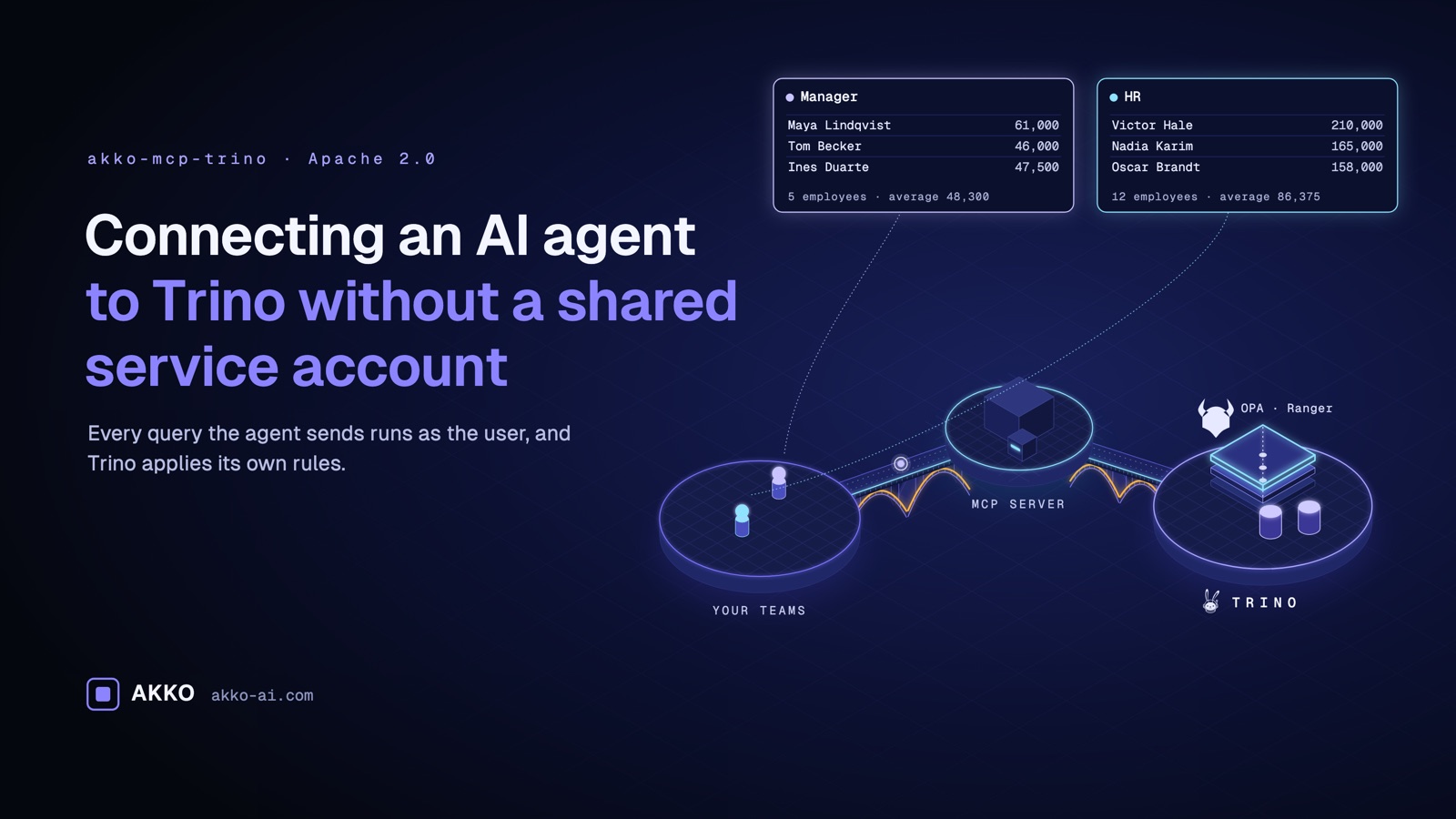
A sales manager opens her company's new AI assistant and asks for the average salary of her team. It answers €86,375. The number is wrong. The assistant queried the database through a shared service account with HR's rights, so it averaged all 12 employees, executives included. Along the way it read salaries she has no right to see, and nothing would stop it from giving her the CEO's salary if she asked. With her own rights, the same question returns €48,300: the average of her team of five, herself included.
Contents
- What can go wrong
- Designs I ruled out
- The architecture, one layer at a time
- Read-only, checked on the syntax tree
- The tools the agent gets
- One request, start to finish
- Installing the server and connecting a client
- In production
- Pitfalls I ran into
- What I measured
- What the server does not do
- What I took away
- To reproduce
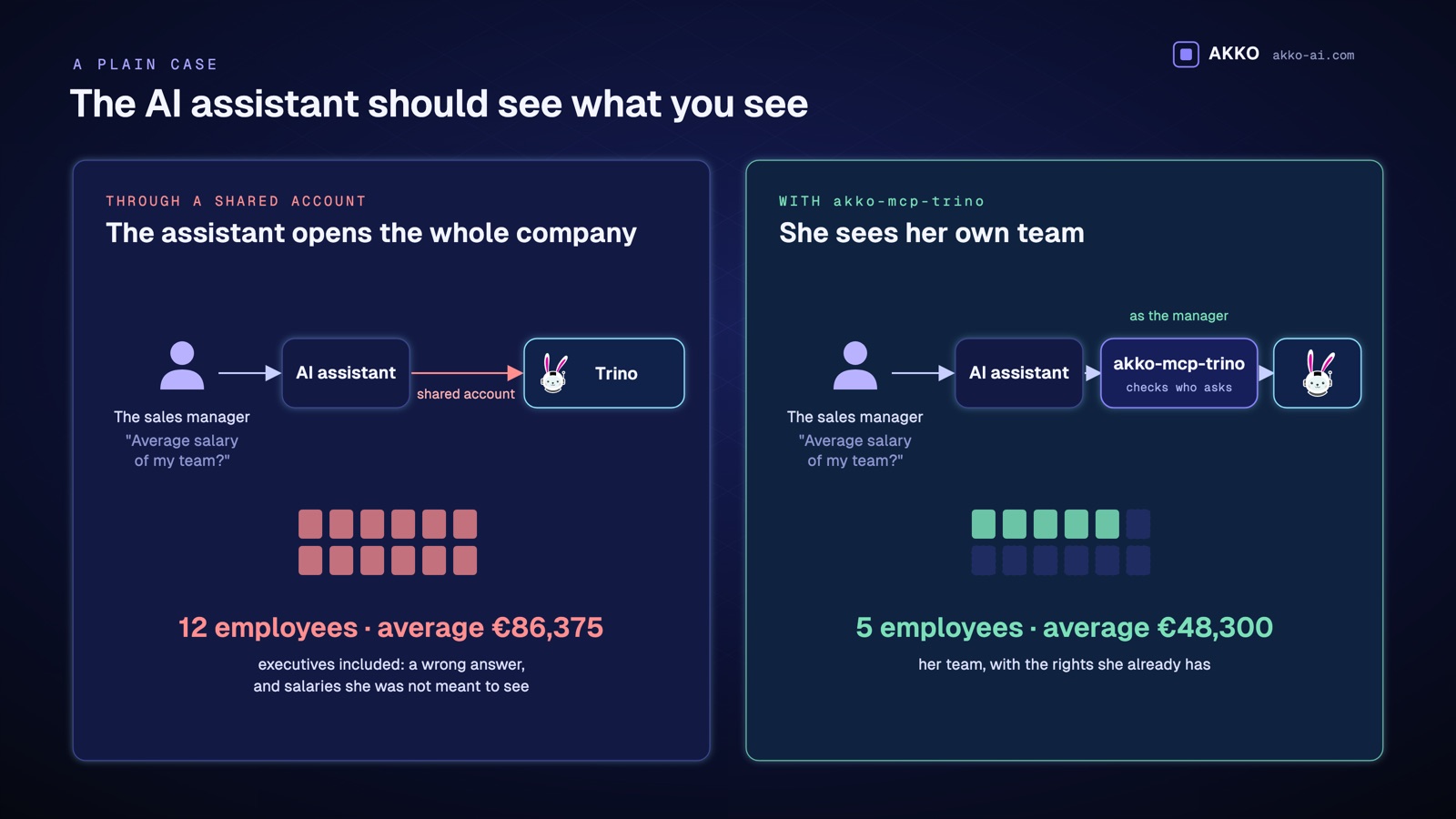
There is nothing unusual about this setup. To connect an AI agent to a query engine, most teams create a service account and put its credentials in the agent’s configuration. On Trino that is a real loss, because access rules are often already written per user, in OPA or Apache Ranger, and the service account bypasses all of them.
I wrote akko-mcp-trino to keep those rules in force when an agent asks the question. It is an MCP server written in Python, released under Apache 2.0, and installed with pip install akko-mcp-trino.
What can go wrong
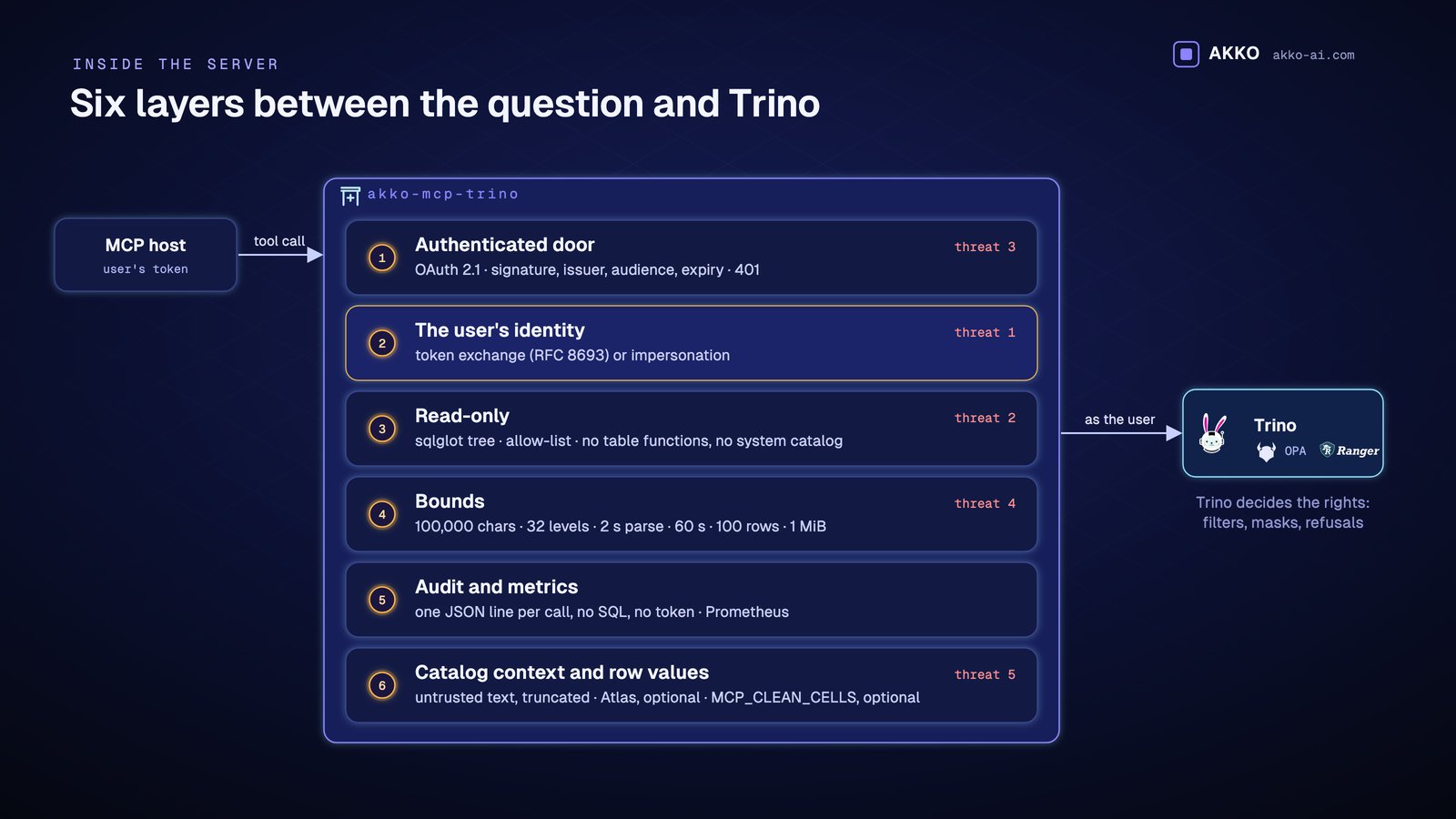
MCP (Model Context Protocol) lets a language model call tools: list catalogs, describe a table, run a query. The model writes the SQL, and nobody reads it before it goes to Trino. The MCP server is the last place where that SQL can be examined before it reaches Trino, so I listed five risks the server has to cover.
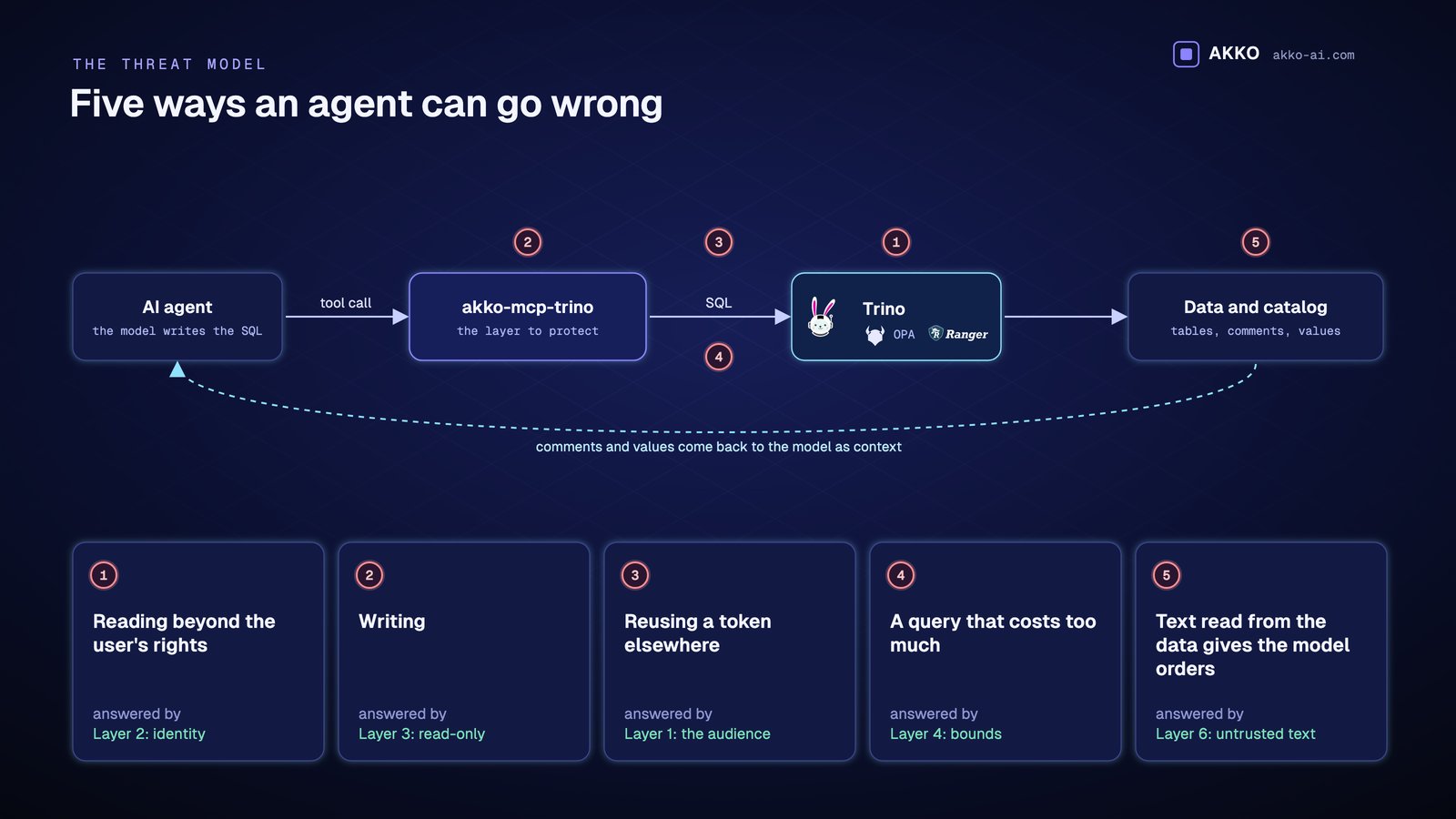
- The agent reads more than the user may. That is exactly what a shared account does, since Trino applies the account’s rights and has no idea who is behind it.
- The agent writes. Nothing stops the model from producing a
DELETE, possibly hidden in a query that starts like a read. - A token is used for something it was not issued for. A token meant for the MCP server must not open Trino, and a token meant for Trino must not open the server.
- A query costs too much. The model can ask for millions of rows, start a query that runs for minutes, or send SQL convoluted enough to stall the parser.
- Metadata steers the model. The model reads table comments as context, so a malicious comment can try to tell it what to do.
The server targets a specific kind of environment: a Trino cluster already protected by OPA or Apache Ranger, an OIDC identity provider (IdP) that may or may not support token exchange, and Kubernetes or OpenShift for hosting. I picked Python because the teams who run it need to read and patch the code without learning a new language.
Designs I ruled out
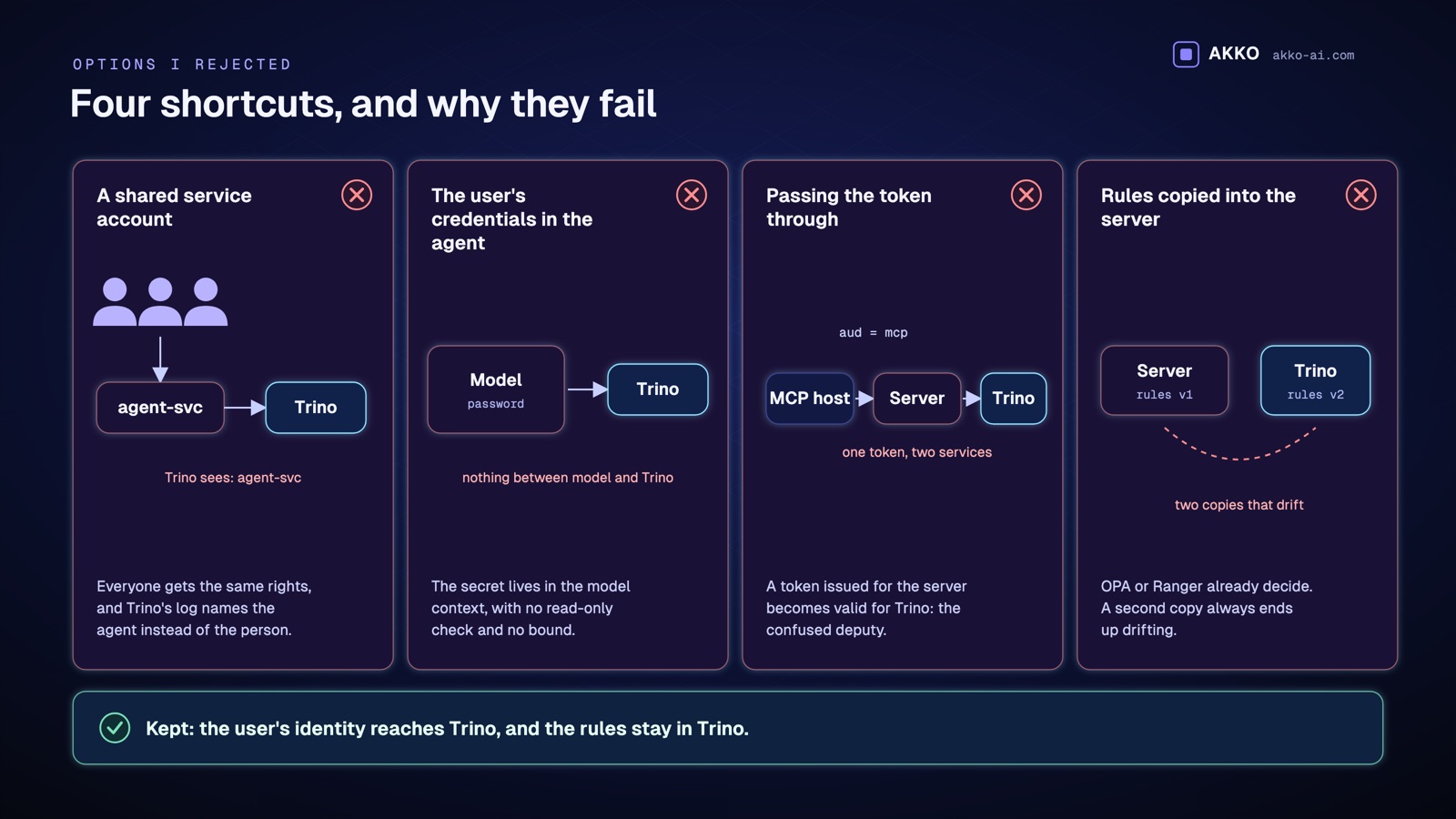
The first idea is to keep the service account and narrow its rights. That limits the damage, yet everyone still goes through the same identity. The manager and HR get the same answer, and Trino’s query log only shows the service account. An auditor who wants to know who read what has nothing to go on.
Another option is to give the agent the user’s own Trino credentials. The password or token then ends up in the model’s context or in the client configuration, and the model inherits all of the user’s rights, including the right to write, with nothing checking its SQL.
Early versions of the server did something else: they forwarded the user’s token to Trino as is. The MCP authorization specification forbids this, for good reason. The specification calls it token passthrough: a token issued for the MCP server becomes usable against a second service, which can no longer tell whom it was meant for. I removed that mode and replaced it with the two mechanisms described below.
The last temptation is to rewrite the SQL in the server and add each user’s filters there. That copies what OPA or Ranger already decide, and two copies of the same rule always drift apart. So the server holds no rule about data. Rights are decided in Trino, for the agent as for any other client.
The architecture, one layer at a time
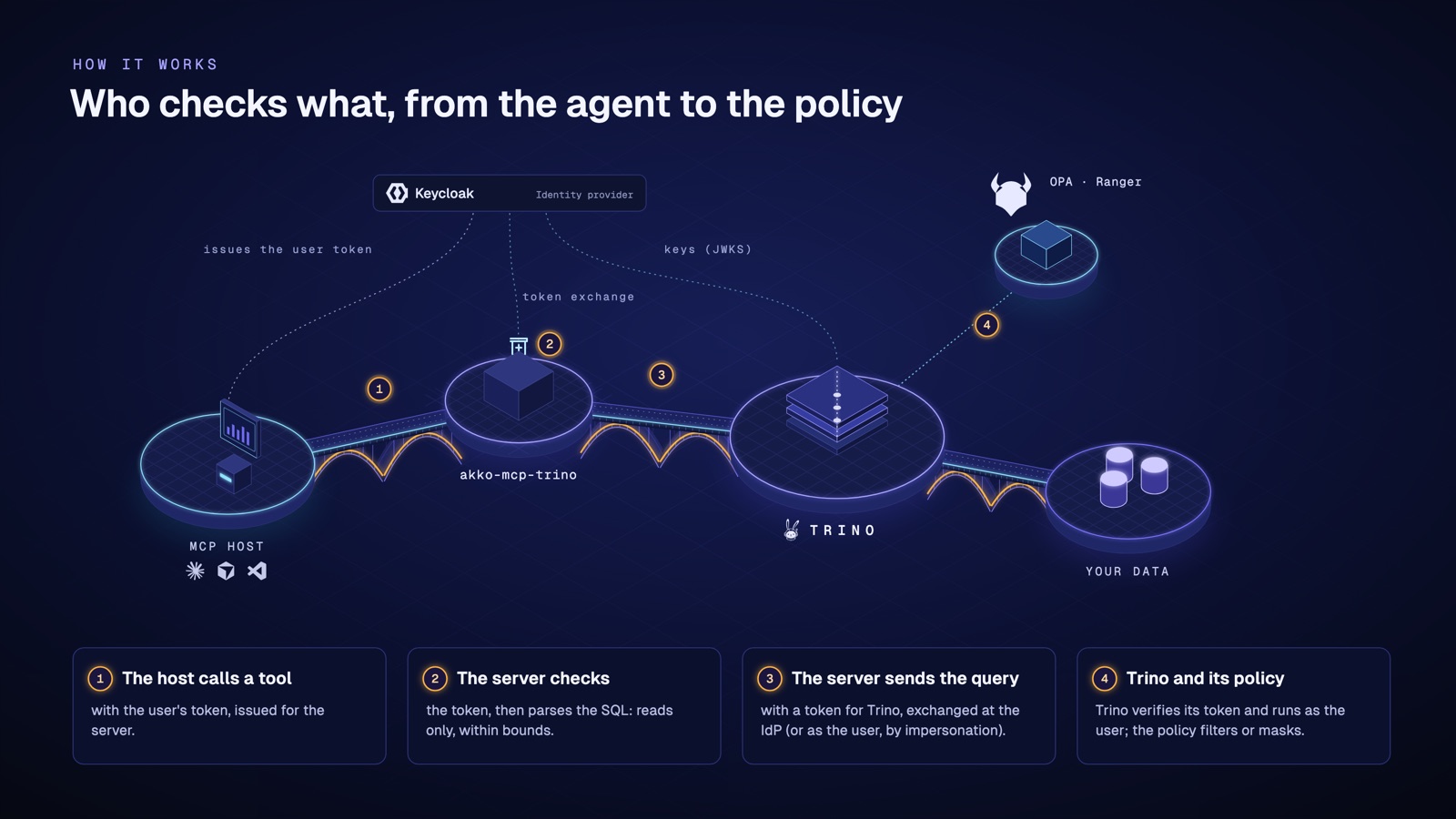
The server stacks six layers, from authentication to catalog context. Five of them each answer one of the risks above; the audit layer records afterwards who called which tool, while the query text stays in Trino’s own log.
Authentication
The server acts as an OAuth 2.1 resource server and rejects any request without a valid token. It checks the token’s signature against the IdP’s public keys (the JWKS), then the issuer, the audience and the expiry. A request without a token gets a 401. If you set the server’s public address (MCP_RESOURCE_URL), that error also tells the client where to get a token, as RFC 9728 describes. The audience check matters more than it looks. In the sandbox, a token signed by the right IdP and not expired, but issued for Trino, is rejected by the server. Trino runs the same check on its side, so a token issued for the server does not open Trino either.
The user’s identity, all the way to Trino
Everything else depends on this: the server has to run each query as the person who asked. It has two ways to do that, chosen in the configuration.
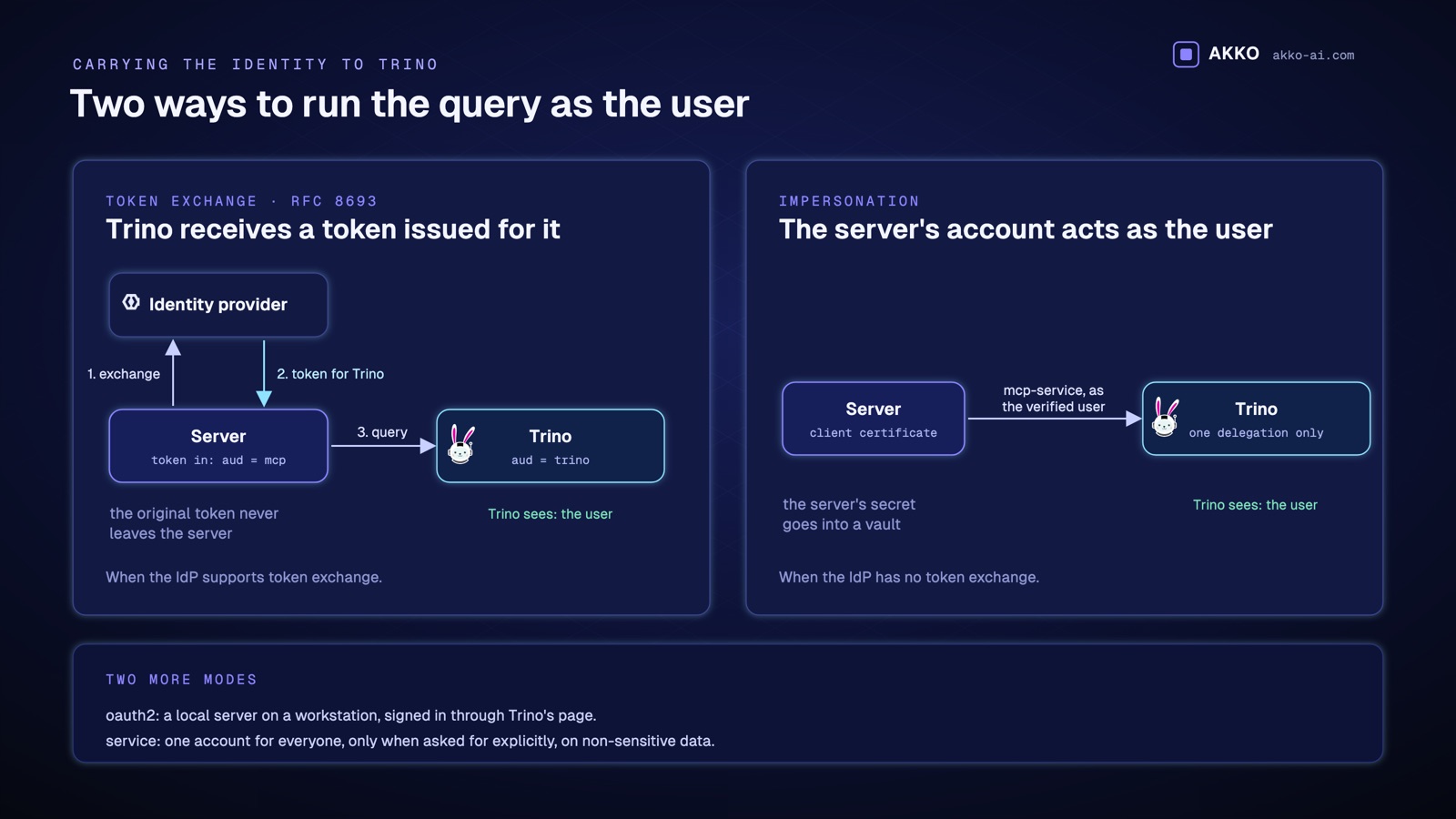
- Token exchange (RFC 8693). Once the user’s token is verified, the server asks the IdP to exchange it for a new token issued for Trino. Trino verifies that token and runs the query as the user. The original token goes only to the IdP that issued it, for the exchange, and never to Trino.
- Impersonation. Some IdPs cannot exchange tokens. In that case the server connects to Trino with its own account (
TRINO_USER), authenticated with a client certificate (TRINO_CLIENT_CERTandTRINO_CLIENT_KEY) or a password, always over HTTPS, and asks Trino to run the query as the verified user. You allow that account, and only that one, to act on behalf of others.
In both cases Trino knows who is asking, OPA or Ranger apply the filters and masks that concern that person, and Trino’s log records the query under their name. The server offers two other modes for narrower uses: oauth2, for a local server on a workstation where the user signs in through Trino’s own page, and service, which is the shared account again and should only serve for a first test on harmless data.
Read-only
This layer, the most involved one, is covered in the next section.
Limits
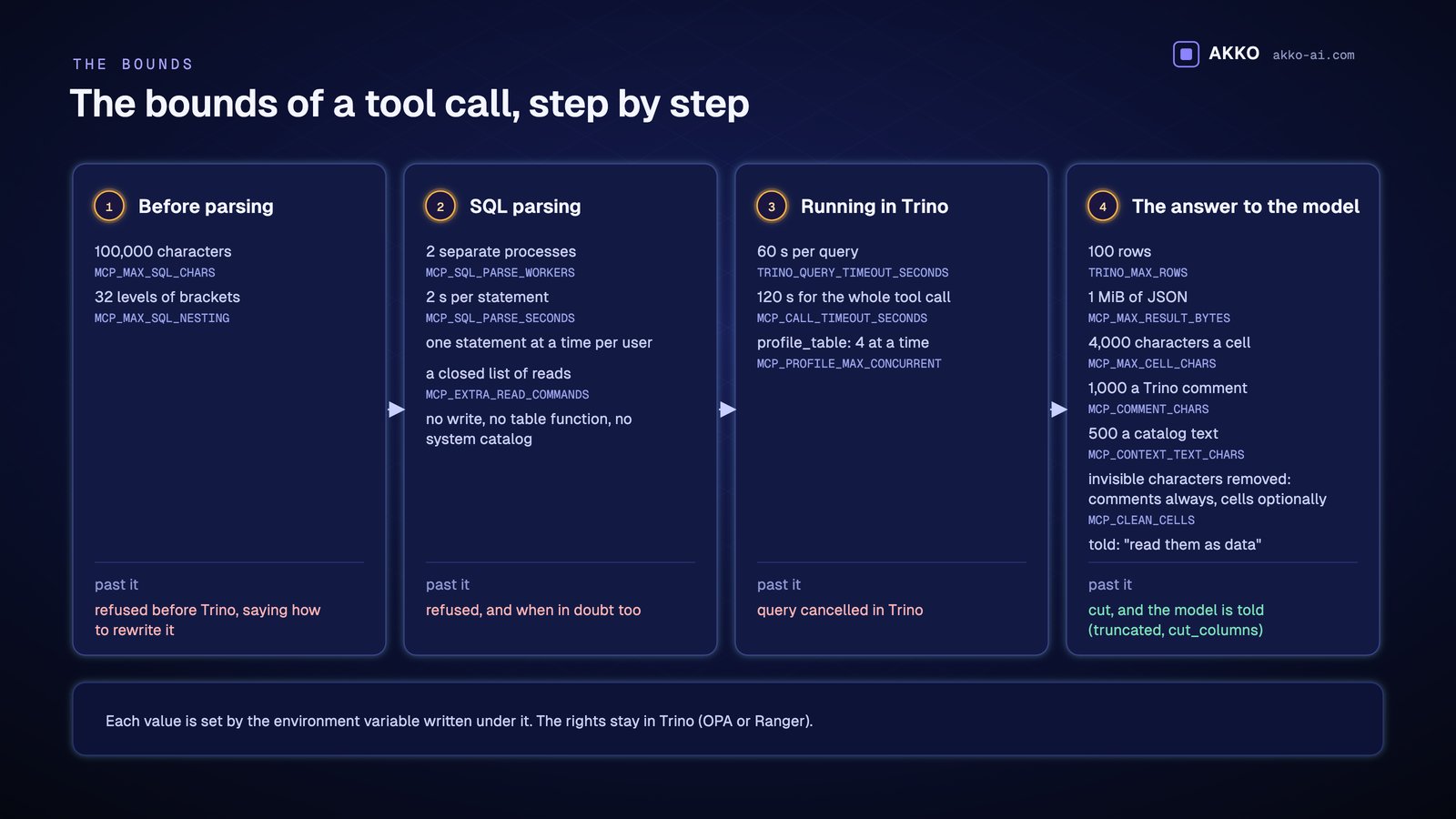
The server rejects a query longer than 100,000 characters, or with brackets nested more than 32 levels deep, before it even parses it. Parsing gets two seconds. A query can run for 60 seconds in Trino, which then cancels it, and a whole tool call cannot exceed 120 seconds. The answer sent back to the model holds at most 100 rows, 1 MiB of JSON and 4,000 characters per cell. When an answer is cut, the server says so, and the model can narrow its query. Every limit is an environment variable.
Audit and metrics
Each tool call writes one JSON line to the log: the call id, the tool, the user, the result, the error code and the duration. The line never contains the token or the query text, since either one can carry secrets or data the person reading the log should not see. Prometheus metrics and the two health probes listen on a separate port (3001). The liveness probe does not query Trino, so a Trino outage does not get the server restarted.
Catalog context, optional
A context provider (Apache Atlas, for now) can add owners, classifications and glossary terms to table descriptions. The server only asks it about tables that Trino has already shown to the user, so the catalog cannot reveal a hidden table. That text, like Trino’s table comments, is stripped of the invisible characters that can hide an instruction (control characters, zero-width characters, text-direction marks). It is then cut to 500 characters (1,000 for a Trino comment) and handed to the model with an instruction to treat it as data, never as instructions.
Read-only, checked on the syntax tree
Most SQL guards look at the first word of a query: SELECT goes through, DELETE is refused. Here is a query that starts with WITH:
WITH gone AS (DELETE FROM demo.hr.employees) SELECT count(*) FROM goneTrino itself would reject this one, because it does not allow writes inside a CTE. But a filter that only reads the first word sees a read and lets it through, leaving the engine as the only safeguard. I did not want to depend on that alone. The server parses every query with the sqlglot library, in the Trino dialect, and inspects the whole syntax tree. This is the tree for the query above, as produced by the sqlglot version the server pins (I only removed a few attributes):
Select(
  expressions=[Count(this=Star(), big_int=True)],
  from_=From(this=Table(this=Identifier(this=gone, quoted=False))),
  with_=With(
    expressions=[
      CTE(
        this=Delete(
          this=Table(
            this=Identifier(this=employees, quoted=False),
            db=Identifier(this=hr, quoted=False),
            catalog=Identifier(this=demo, quoted=False))),
        alias=TableAlias(this=Identifier(this=gone, quoted=False)))]))
The top of the tree is a Select, but a Delete sits three levels down. The server walks every node, runs into that Delete and rejects the query.
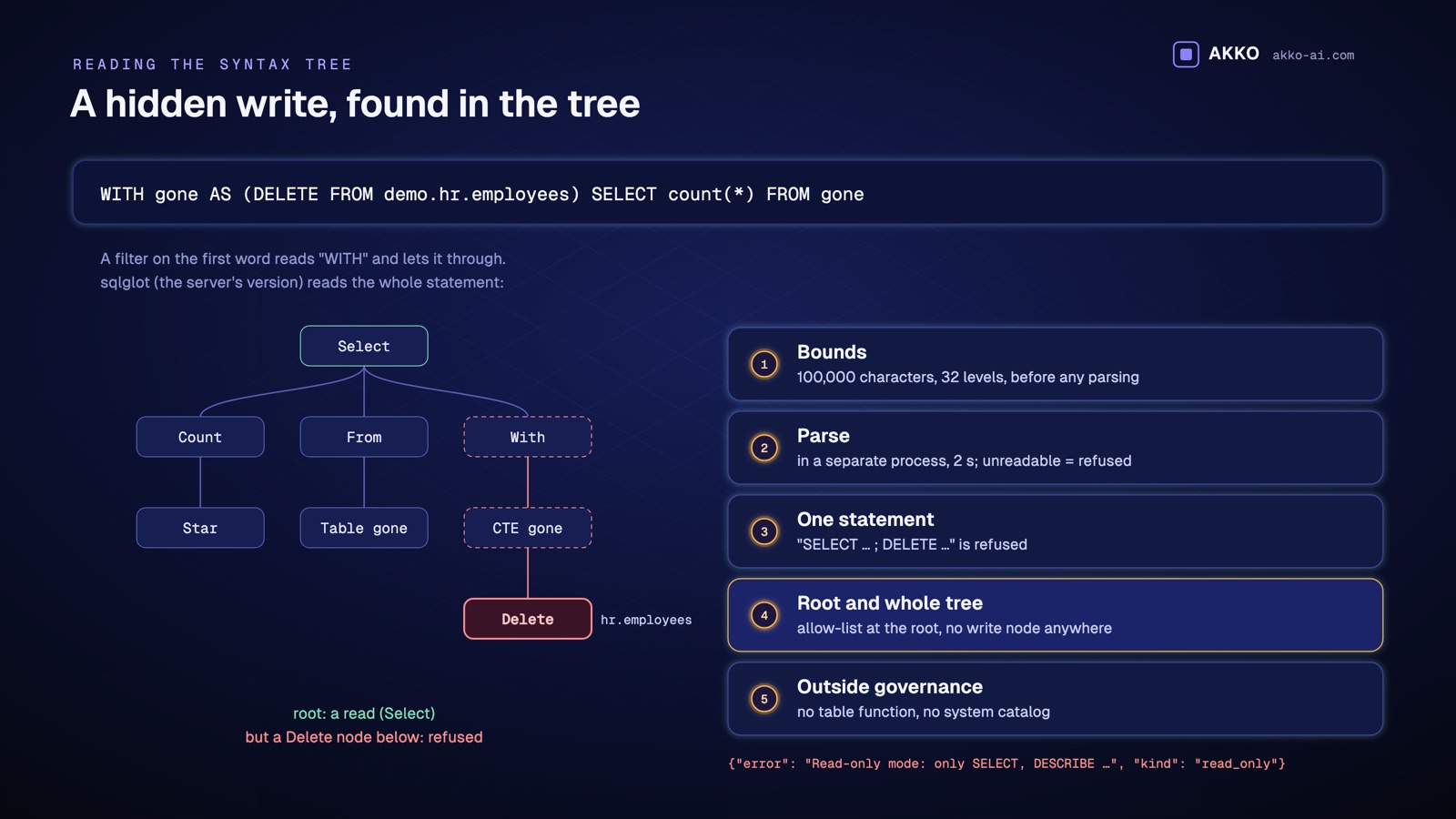
Every query the model writes goes through five checks, in order.
- Size, before any parsing. The server measures the query’s length and bracket depth in a single pass over the text. Past 100,000 characters or 32 levels, it refuses without calling sqlglot at all, and tells the model how to rewrite the query.
- Isolated parsing that fails closed. sqlglot runs in two separate worker processes, with two seconds per query. A query built to stall the parser ties up one of those processes, and only until the deadline. If both are busy, the call is refused straight away instead of waiting in a queue. A query sqlglot cannot parse is refused too.
- One statement.
SELECT avg(salary) FROM demo.hr.employees; DELETE FROM demo.hr.employeesproduces two trees, aSelectand aDelete. The server refuses any query that produces more than one tree, without even looking at what they contain. - A read at the top, no write below. The top of the tree must be on a closed list:
SELECT(includingUNIONorVALUES),DESCRIBEof a table, orSHOW CATALOGS,SCHEMAS,TABLES,COLUMNSorFUNCTIONS.EXPLAINand the otherSHOWvariants are refused until an operator enables them one by one inMCP_EXTRA_READ_COMMANDS. Then the server checks that no node in the tree is a write: insert, update, delete, merge, create, drop, alter, truncate, grant, set, or any statement sqlglot cannot classify (aCommandnode). - Nothing that escapes Trino’s rules. A table function such as
TABLE(demo.system.query(query => 'DELETE FROM employees'))sends raw SQL straight to the source database, past Trino’s filters and masks. In the tree it shows up as aTablenode holding a function call instead of a table name, and the server refuses it. It also refuses thesystemcatalog, which exposes the engine’s internal state, other users’ queries included.
The names the agent passes to tools (catalogs, schemas, tables) are always quoted before they go into a query, with any double quote inside them doubled, so that a table name cannot close the quote and slip SQL in after it. All of this checking is on by default. An operator can turn it off with TRINO_READ_ONLY=false. The size and time limits then stay in place, but checks 3 to 5 are gone, and execute_query, the tool that runs queries, is then presented to the model as able to write. That is one more reason for Trino’s policy to refuse writes as well, as the sandbox’s policy does for the employees table.
The tools the agent gets
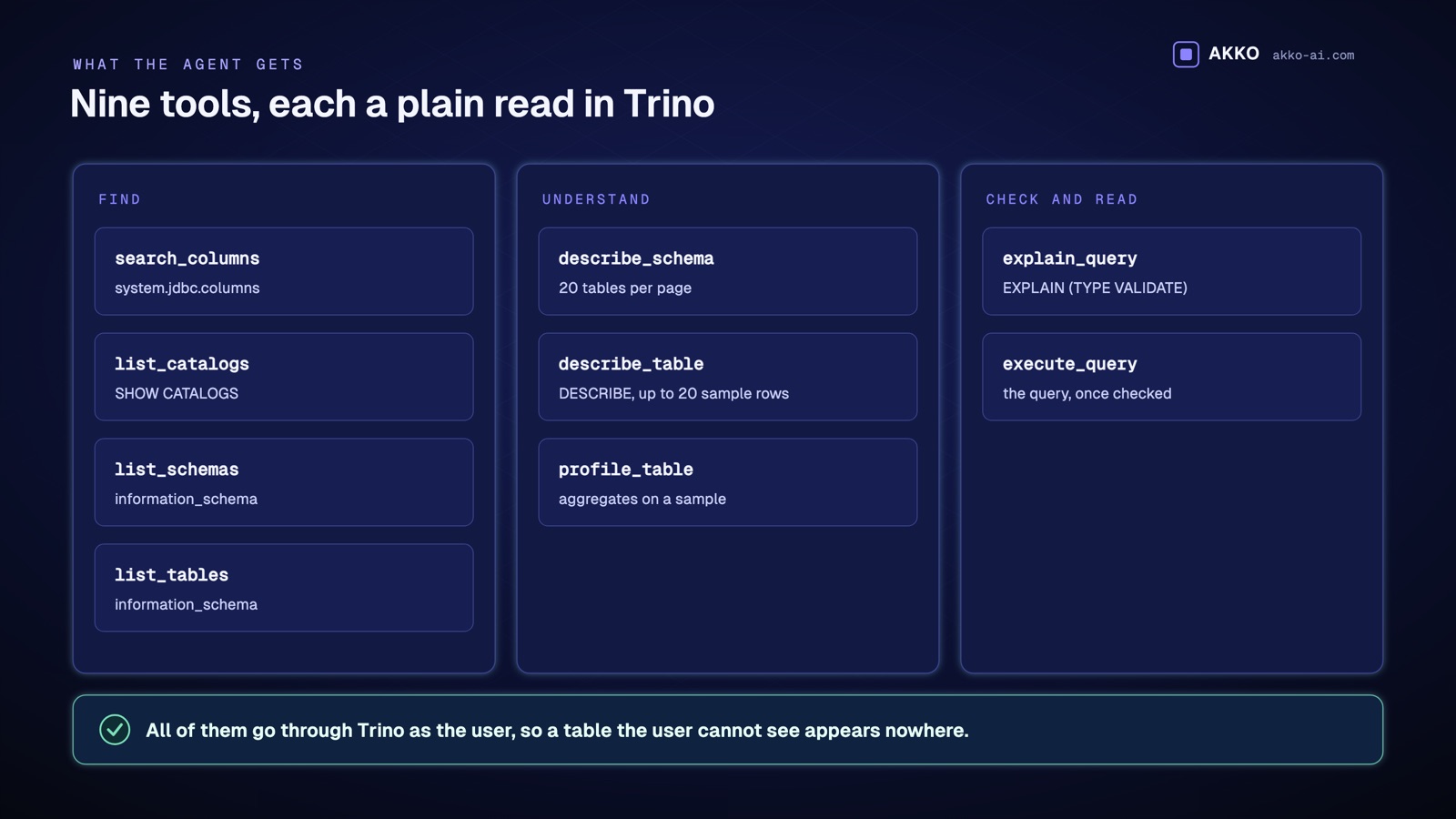
The server exposes nine tools, and most of them help the model understand the data before it writes a query. search_columns looks for a word in column names and table comments. list_catalogs, list_schemas and list_tables walk the hierarchy. describe_schema describes a schema twenty tables at a time, and describe_table describes one table, with up to twenty sample rows if asked. profile_table counts rows and distinct values and reports the minimum and maximum, on a sample. Finally, explain_query has Trino validate a query without running it: the tool adds EXPLAIN (TYPE VALIDATE) itself, which the model cannot do. execute_query runs the query once every check has passed.
One request, start to finish
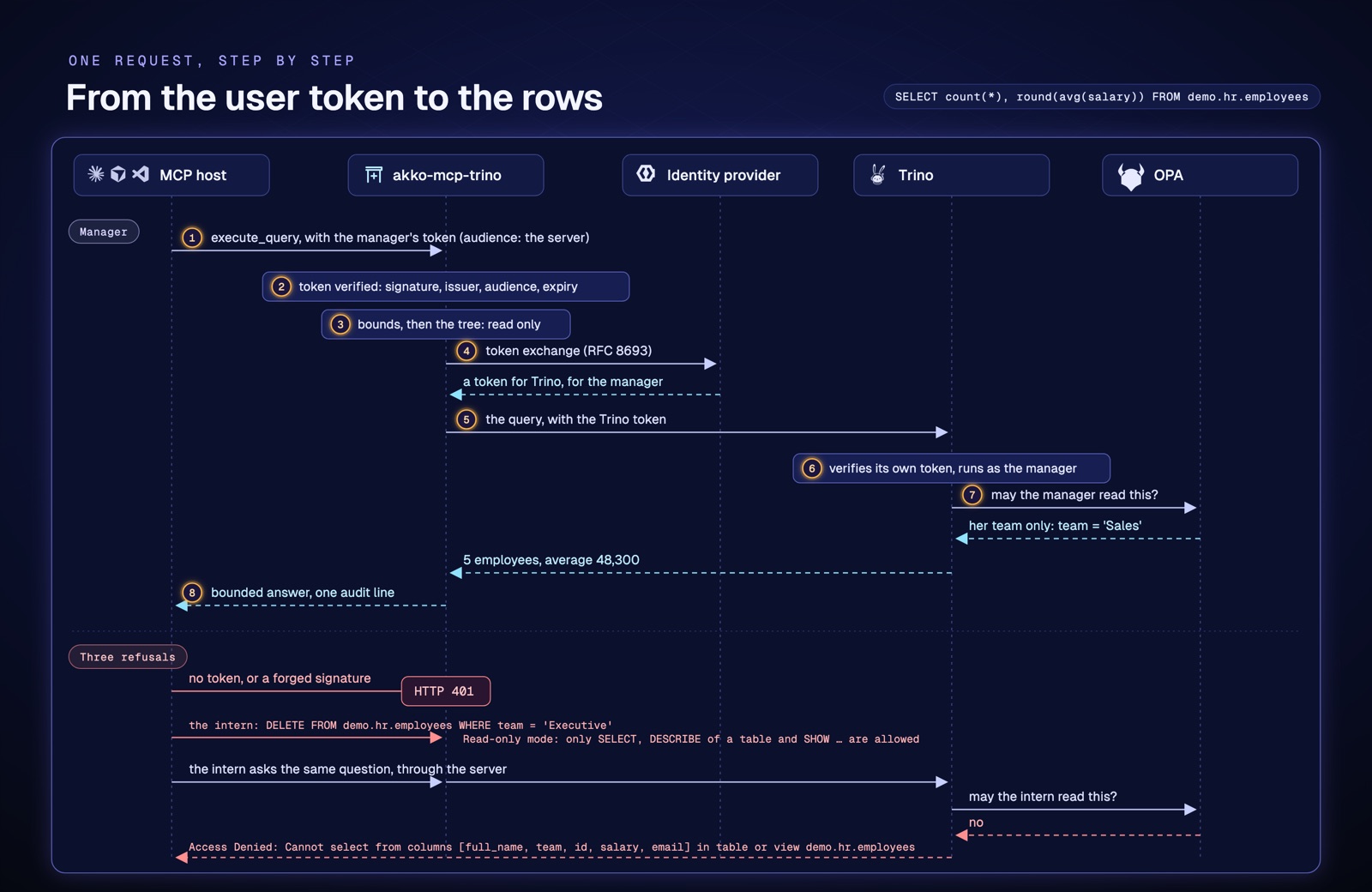
For this article I added an HR scenario to the public sandbox. Trino runs there with Keycloak as the IdP and OPA for access control, over a table of twelve fictional employees, and three accounts query it: manager, who leads the Sales team, hr, who sees everyone, and intern, who has no rights on the table.
When the manager asks for the average salary (SELECT count(*), round(avg(salary)) FROM demo.hr.employees), this is what happens.
- Her MCP client calls
execute_queryand attaches her token, issued for the server. - The server checks the token’s signature, issuer, audience and expiry.
- It runs the SQL through the five checks.
- It exchanges the token at Keycloak for a token issued for Trino.
- It sends the query to Trino with that new token.
- Trino verifies the token and recognises
manager. - It asks OPA what
managermay read; OPA answers with a filter,team = 'Sales', which Trino applies when it runs the query. - The server caps the size of the answer, returns it to the client and writes one audit line.
The sandbox script replays this scenario through the official MCP client, for each of the three accounts:
2. Who does Trino see?  SELECT current_user
   token of manager  ->  Trino runs the query as manager
   token of hr       ->  Trino runs the query as hr

3. The same question, two answers decided by the policy in Trino
   manager  ->  5 employees, average 48,300 EUR   (her team only)
   hr       ->  12 employees, average 86,375 EUR   (everyone, executives included)

4. The intern asks the same question
   Access Denied: Cannot select from columns [full_name, team, id, salary, email] in table or view demo.hr.employees

5. Each one looks for a column about salaries (tool search_columns)
   manager  ->  demo.hr.employees.salary
   intern   ->  no match, the search is complete

6. The intern asks the assistant to remove the executives from the table
   DELETE FROM demo.hr.employees WHERE team = 'Executive'
   Read-only mode: only SELECT, DESCRIBE of a table and SHOW CATALOGS, SCHEMAS, TABLES, COLUMNS or FUNCTIONS are allowed

7. HR sends the same DELETE straight to Trino, without the MCP server
   Access Denied: Cannot delete from table demo.hr.employees
OPA removed the other teams’ rows, because Trino asked it what manager could read. The server applies no filter itself. The intern does not even see the table when searching for a salary column, and the attempt to delete rows is stopped before it reaches Trino. Step 7 deliberately goes around the server: HR sends the same delete straight to Trino, and this time the policy refuses it. On this table, if either protection were missing, the other would still hold. The sandbox’s policy refuses writes on the employees table only; yours should refuse them wherever an agent can reach.
Every call leaves a trace in the audit log. These are the lines for the manager’s question, the intern’s read refused by Trino, and the intern’s delete refused by the server:
INFO:mcp.audit:{"request_id":"f1c4d15746134cca8e28dd125d1ad0a1","tool":"execute_query","subject":"manager","ok":true,"error":"","duration_ms":104}
INFO:mcp.audit:{"request_id":"7ea5974b200443368198418bef4be513","tool":"execute_query","subject":"intern","ok":false,"error":"USER_ERROR:PERMISSION_DENIED","duration_ms":47}
INFO:mcp.audit:{"request_id":"eca863ac695b483d8ef6dbd3ce5ddfed","tool":"execute_query","subject":"intern","ok":false,"error":"read_only","duration_ms":1}
Installing the server and connecting a client
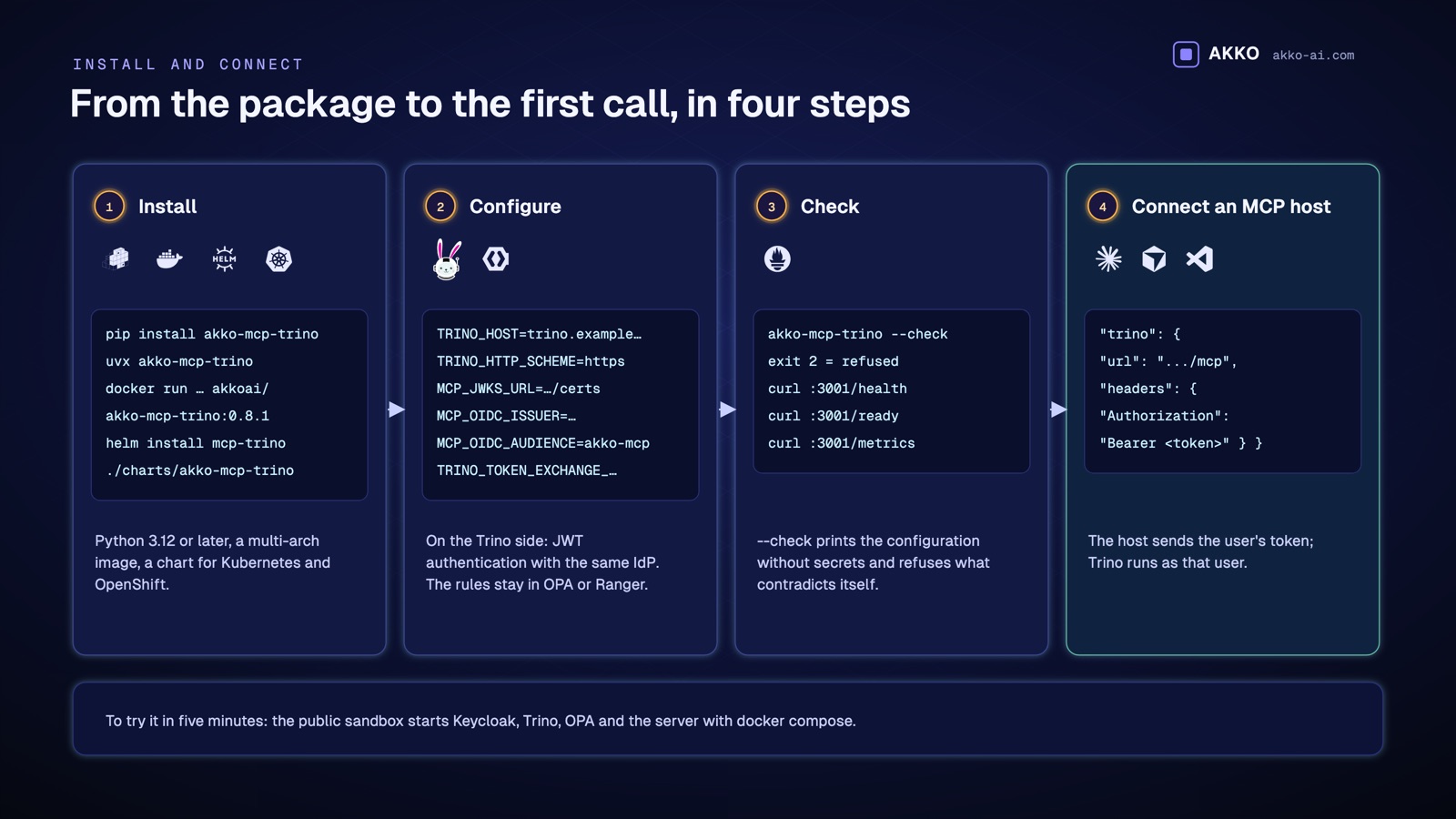
Try it in five minutes
The quickest route is the sandbox, which bundles Keycloak, Trino, OPA and the server. You need Docker with Compose v2 and about 2.5 GB of free memory:
git clone https://github.com/AKKO-p/akko-sandbox.git
cd akko-sandbox
docker compose up -d --wait
./demo.sh --hr            # the HR scenario described above
./demo.sh --hr --check    # the same scenario, as 15 checks
Install
The server is a Python package (Python 3.12 or later) that provides the akko-mcp-trino command:
pip install akko-mcp-trino     # or: pipx install akko-mcp-trino
uvx akko-mcp-trino --version   # run it without installing, as many MCP clients do
It also ships as a multi-architecture Docker image, akkoai/akko-mcp-trino, and as a Helm chart.
Configure it for your Trino
The default configuration is the cautious one: every query runs as the user, through token exchange, and any request without a token is refused. All that is left is to tell the server where Trino and the IdP are, then start it:
export TRINO_HOST=trino.example.internal TRINO_PORT=8443 TRINO_HTTP_SCHEME=https
export TRINO_CATALOG=iceberg     # default catalog; without it the server falls back to system, whose tables it refuses
export MCP_JWKS_URL=https://idp.example.com/realms/data/protocol/openid-connect/certs
export MCP_OIDC_ISSUER=https://idp.example.com/realms/data
export MCP_OIDC_AUDIENCE=akko-mcp
export MCP_RESOURCE_URL=https://mcp.example.com/mcp
export MCP_JWT_USER_CLAIM=preferred_username
export TRINO_TOKEN_EXCHANGE_URL=https://idp.example.com/realms/data/protocol/openid-connect/token
export TRINO_TOKEN_EXCHANGE_CLIENT_ID=akko-mcp TRINO_TOKEN_EXCHANGE_AUDIENCE=trino
read -rs TRINO_TOKEN_EXCHANGE_CLIENT_SECRET && export TRINO_TOKEN_EXCHANGE_CLIENT_SECRET
akko-mcp-trino     # MCP on port 3000, probes and metrics on port 3001
On the Trino side, nothing is specific to the agent. Trino only has to trust the same IdP:
http-server.authentication.type=JWT
http-server.authentication.jwt.key-file=https://idp.example.com/realms/data/protocol/openid-connect/certs
http-server.authentication.jwt.principal-field=preferred_username
http-server.authentication.jwt.required-issuer=https://idp.example.com/realms/data
http-server.authentication.jwt.required-audience=trino
Your access rules stay in OPA or Ranger, unchanged. If your IdP cannot exchange tokens, switch to impersonation: set TRINO_IDENTITY_MODE=impersonation, TRINO_USER to the server’s account, TRINO_CLIENT_CERT and TRINO_CLIENT_KEY to its certificate and key, and in Trino, allow only that account to act on behalf of others.
Check before opening the traffic
akko-mcp-trino --check reads the configuration back, prints it without any secret, and exits with code 2 if a setting would stop the server from starting. With the sandbox configuration, it prints, among other lines:
trino identity mode: jwt over https
trino identity: the verified caller, with a token for Trino obtained by token exchange; the caller's own token never leaves the server
token exchange: https://keycloak:8443/realms/sandbox/protocol/openid-connect/token as client akko-mcp (secret set), audience trino
agent SQL: up to 100000 characters, brackets nested 32 deep at most, refused past either before it is parsed; parsed by 2 worker processes within 2 s, one statement at a time per caller
The second line simplifies: the user’s token does go to the IdP for the exchange, but never to Trino. An impersonation setup without token verification does not start, and the message says why:
PROBLEM: TRINO_IDENTITY_MODE=impersonation runs every query as the verified caller and needs MCP_AUTH_ENABLED=true and MCP_AUTH_REQUIRED=true; to run every query as TRINO_USER instead, set TRINO_IDENTITY_MODE=service
exit: 2
Once the server is running, curl -s localhost:3001/health answers {"status":"ok"} without querying Trino. /ready answers 503 as long as Trino is unreachable, and /metrics publishes counters for queries, errors, refusals and durations.
Connect an MCP client
The MCP endpoint is https://<your server>/mcp. A client that speaks Streamable HTTP, such as Cursor, passes the user’s token in a header:
{
  "mcpServers": {
    "trino": {
      "url": "https://mcp.example.com/mcp",
      "headers": { "Authorization": "Bearer <the user's access token>" }
    }
  }
}
The repository documents the setup for Claude Desktop, VS Code and other clients, as well as the stdio mode, where the client starts the server itself on the user’s machine.
In production
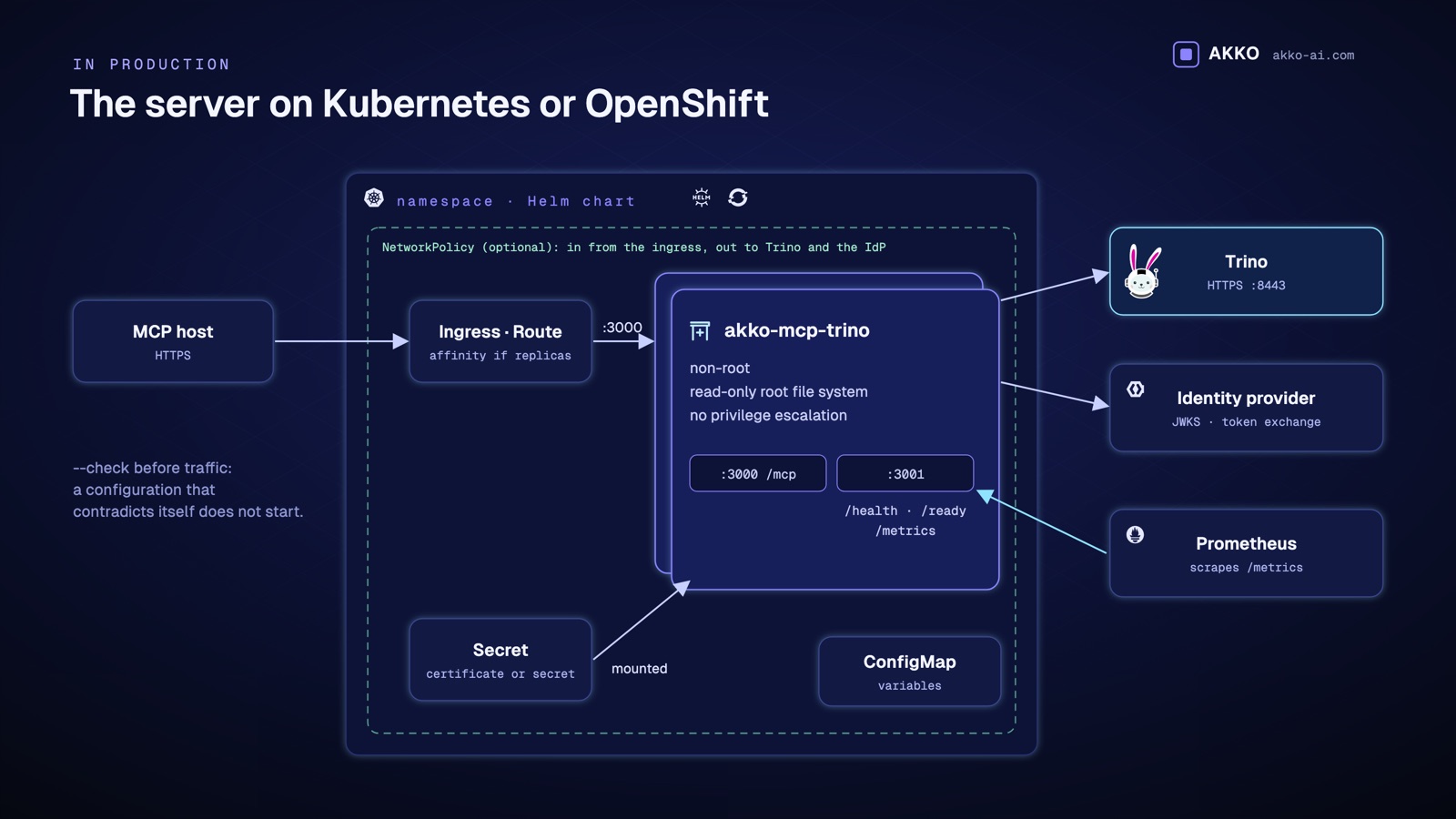
The Helm chart lives in the server’s repository. Once it is installed, helm test runs --check with the release’s actual configuration:
git clone --branch v0.8.1 https://github.com/AKKO-p/akko-mcp-trino.git && cd akko-mcp-trino
helm install mcp-trino ./charts/akko-mcp-trino -f my-values.yaml
helm test mcp-trino --logs
The container runs without root, on a read-only file system, with privilege escalation disabled. The chart creates the Services for the MCP port (3000) and the probes (3001), plus an optional Ingress or OpenShift Route and an optional NetworkPolicy that you point at your ingress controller, Trino and the IdP. Secrets are read from an existing Kubernetes Secret, never from the values file.
The chart is stricter than the server. It rejects system as the default catalog at helm template, while the server accepts it (it is the server’s own default) and then refuses the queries that use it; the chart also rejects token verification turned off without an explicit confirmation. When two settings contradict each other, the server refuses to start, because a warning buried in a pod’s logs is unlikely to be read.
Pitfalls I ran into
MCP sessions live in the memory of a single pod. The Streamable HTTP transport opens a session, and the specification requires a 404 for a session id the server does not know. By default, the chart starts a single replica. If you run two behind a round-robin load balancer, a call can land on the pod that never saw the session and fail. The transport has a sessionless mode, which the server does not enable yet; until it does, set session affinity on the Ingress or Route.
Key rotation and revocation. The server keeps the IdP’s public keys in memory for five minutes (PyJWT’s default behaviour) and reloads them as soon as a token is signed with a key it does not know, so key rotation needs no restart. On the other hand, a key withdrawn at the IdP is still accepted for up to five minutes. And since the server does not call the IdP on every request, a revoked token stays valid until it expires. Short-lived tokens are the safer choice.
Token exchange must be reserved for the server. If any client of the IdP can obtain a Trino token through exchange, an MCP client can get one without going through the server, and every check described above is bypassed. In impersonation mode, what you have to protect is the server’s certificate or password, since whoever holds it can act as any user. It belongs in a secrets manager.
Passwords over HTTP. Trino rejects a password sent over plain HTTP, even a correct one. More surprising: once insecure HTTP is enabled (http-server.authentication.allow-insecure-over-http=true), Trino accepts any user name with no password at all. The server therefore refuses to send a password over an unencrypted connection. If a proxy terminates TLS in front of Trino, give the server that proxy’s HTTPS address.
Queries that stall the parser. A query with brackets nested hundreds of levels deep could keep sqlglot busy for a very long time. That is why the depth is measured before parsing, and why parsing runs in separate processes. The refusal message is written for the model, which can use it to fix its query:
{"error": "The statement nests brackets more than 32 deep; this server reads 32 levels at most. Write it with fewer nested levels, for example with a WITH clause.", "kind": "invalid_argument"}What I measured
The sandbox checks the governance cases automatically: 16 checks for the original scenario, 15 for the HR one. They verify that the server exposes exactly nine tools, that Trino sees the right user behind each token, that filters and masks apply and that column search respects rights. They also check that a write is stopped by the server, and by Trino when sent directly, and that missing, forged or Trino-bound tokens are rejected. All 31 checks passed on 19 November 2026 against the published image akkoai/akko-mcp-trino:0.8.1. The repository’s own tests also run the server against a real Trino and a real IdP, and a script deploys the chart on OpenShift.
For response times, I used the durations in the audit log, which cover the whole trip through the server, token exchange and Trino included. During the HR demo, on a single machine running every service in Docker, the seven successful queries took between 52 and 227 ms (94 ms median), the three column searches between 1.4 and 1.7 seconds, since they read the metadata of every catalog, and the policy refusals between 41 and 47 ms. The three writes stopped by the server were refused in 1 ms, without any round trip to Trino. These numbers hold for the sandbox; I have not published a load test yet.
What the server does not do
It does not replace Trino’s policy. Its read-only check only covers queries that go through it, and it can be turned off. Trino’s policy has to refuse writes as well.
Its parser is not Trino’s. The server decides based on how sqlglot reads the query, while Trino uses its own parser. A query the two read differently remains possible in theory; the closed list and Trino’s policy shrink that risk without removing it.
It does not keep readable data from leaving. Anything the user may read can end up in the model’s context, then with whoever hosts the model, and wherever the client sends it. Which data may reach which model is a decision for a policy in Trino (a dedicated role for agents, for example) or for the choice of model host.
It does not neutralise prompt injection. Cleaning and truncating catalog comments reduces the risk without removing it, and the values in returned rows reach the model untouched. What limits the damage is that the agent can only read what the user may read in the first place.
Update, 19 November 2026: a reader pointed out that row values deserved the same care as comments. Since 0.8.2, the three tools that return row values tell the model to read them as data, and the opt-in setting MCP_CLEAN_CELLS removes hidden characters from text values. It is off by default, so that a query still returns exactly what the table holds.
It does not guarantee a correct answer. The server limits what the agent can read to the user’s rights. It does not check the choice of table or the calculation. Correct answers need a semantic layer and evaluation, which is a separate topic.
It does not rate-limit per user. Limits apply call by call. Per-user quotas belong in an MCP gateway or in Trino’s resource groups.
What I took away
- Run every query under the user’s identity, and keep the rules in OPA or Ranger. When a rule changes, there is only one place to update.
- Parse SQL into a tree. A first-word filter lets a
DELETEhidden in a CTE through, while walking the tree finds it. And the parser must refuse any query it cannot read. - Reject oversized queries before parsing them. The parser is part of the attack surface too.
- Fail at start-up when the configuration contradicts itself, with a one-line message that says what to fix.
- Keep proof that anyone can replay. With
./demo.sh --hr --check, a reader reruns the 15 checks instead of taking the diagram on trust.
The code and documentation are on GitHub, and the sandbox in akko-sandbox. If you run Trino with Ranger or OPA and an IdP that cannot exchange tokens, I would like to know how impersonation fits your setup. Open an issue on the repository and tell me.
To reproduce
- akko-mcp-trino 0.8.1 (
pip install akko-mcp-trino==0.8.1, Python 3.12 or later), the imageakkoai/akko-mcp-trino:0.8.1(digestsha256:bede0ca8…) and its chart 0.3.1, from tagv0.8.1, Apache 2.0, on github.com/AKKO-p/akko-mcp-trino. - The HR scenario of akko-sandbox was run on 19 November 2026 on a Linux machine (Trino 482, Keycloak 26.7.5, OPA 1.21.1). The employees and salaries are fictional.
- The syntax trees come from sqlglot 30.30.0, the version pinned in the server’s image, using the Trino dialect.
- Installation,
--check, probes and the chart rendering were tested on 18 November 2026 in a blankpython:3.12-slimcontainer and with Helm. Trino’s behaviour with passwords over HTTP was observed on Trino 484.
akko-mcp-trino is published by AKKO, a sovereign data & AI platform project.