


Trino 484: what's new, tested (JSON, EXCLUDE, Iceberg)
Trino 484 in seven queries
Standard SQL/JSON, precise intervals, EXCLUDE in window frames, and fixes for silently wrong results. Every example ran on the previous release, then on Trino 484.
Contents
- The seven changes in Trino 484 at a glance
- Set up
- Change 1 · JSON_TABLE finally reads the JSON type
- Change 2 · JSON keeps its order and its numbers
- Change 3 · Intervals with a precise type
- Change 4 · CREATE VIEW IF NOT EXISTS protects the existing view
- Change 5 · EXCLUDE compares a row with the others
- Change 6 · Wrong results fixed
- Change 7 · Iceberg accepts sorted_by and gc_enabled
- Tutorial recap
- Also in 484
- Before you upgrade
- Test yourself
- What you’ve learned
- Frequently asked questions
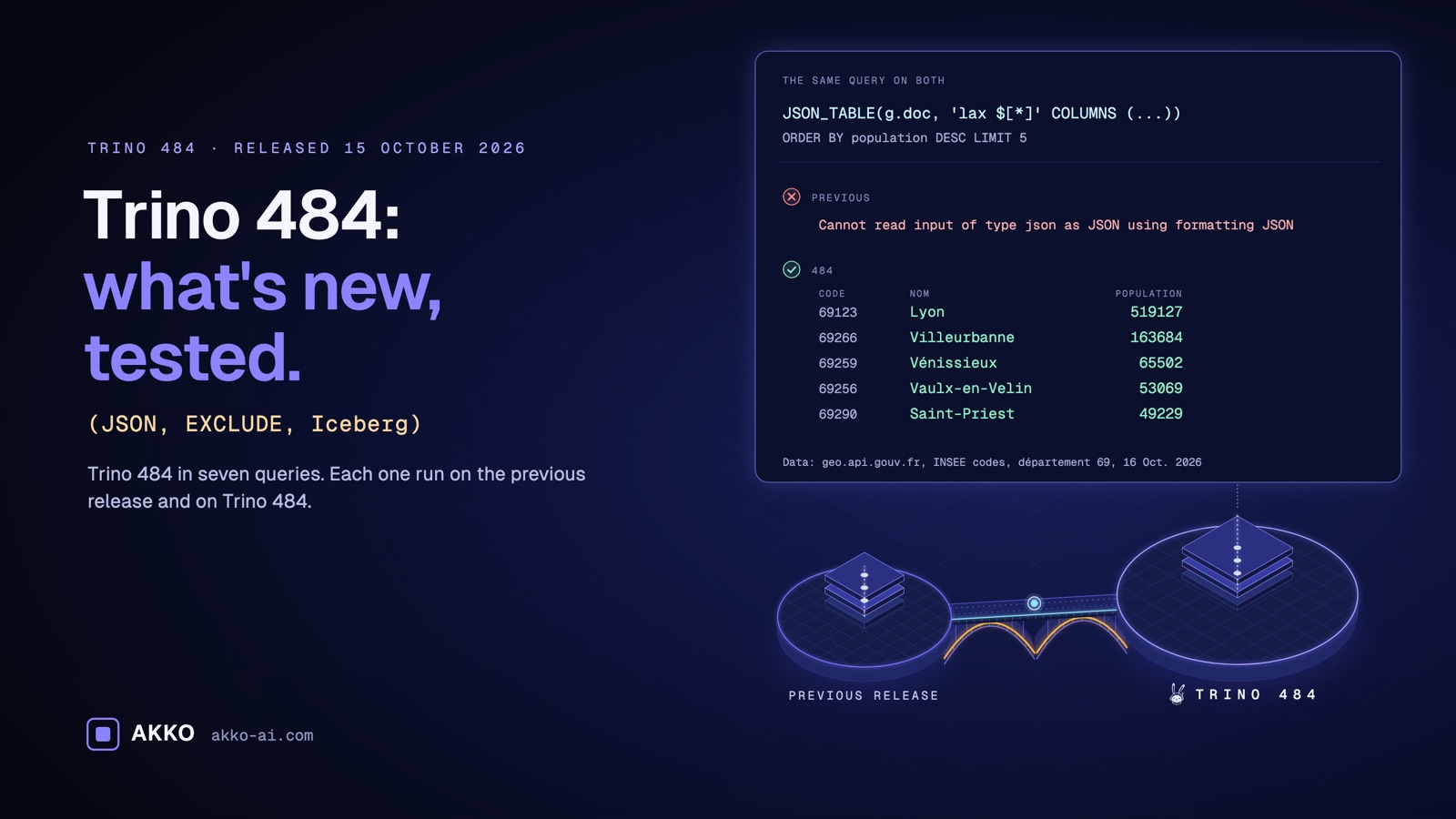
Load a JSON API response into Trino, read one record back, and compare. Here is the first commune that France’s administrative boundaries API returns for département 69: {"nom":"Affoux","code":"69001",...}.
On the previous release, the same record comes back as {"centre":...,"code":"69001",...,"nom":"Affoux","population":398}. The keys are sorted and the name drops to the end. Trino 484 returns {"nom":"Affoux","code":"69001",...}, in the API’s order.
That small difference sums up the 15 October 2026 release. Trino moves closer to standard SQL and stops rewriting your JSON. It can also break your tests.
In this tutorial, you’ll learn how to:
- run Trino 484 on your machine with one command;
- read a JSON API response as a table, with JSON_TABLE;
- flatten a nested array into rows, with NESTED PATH;
- subtract two timestamps and choose the fields of the resulting interval;
- create a view without overwriting the one that exists;
- compare a row with the average of the others, with EXCLUDE;
- spot a wrong result that Trino 484 fixes.
The seven changes in Trino 484 at a glance
Each card links to its section, with a demo you can run yourself.
hour(INTERVAL '36' HOUR) now returns 36, not 12.See change 3 →NEWCREATE VIEW IF NOT EXISTS protects the existing viewA view is created only when it does not exist yet.See change 4 →NEWEXCLUDE compares a row with the othersA window function can leave the current row out.See change 5 →FIXEDWrong results fixedBy our count, 54 entries (49 distinct fixes) target queries that returned a wrong result with no error.See change 6 →NEWIceberg accepts sorted_by and gc_enabledCompaction accepts a sort order and, according to the release notes, gc_enabled = false protects data files from deletion. Materialized views also accept COMMENT and optimize.See change 7 →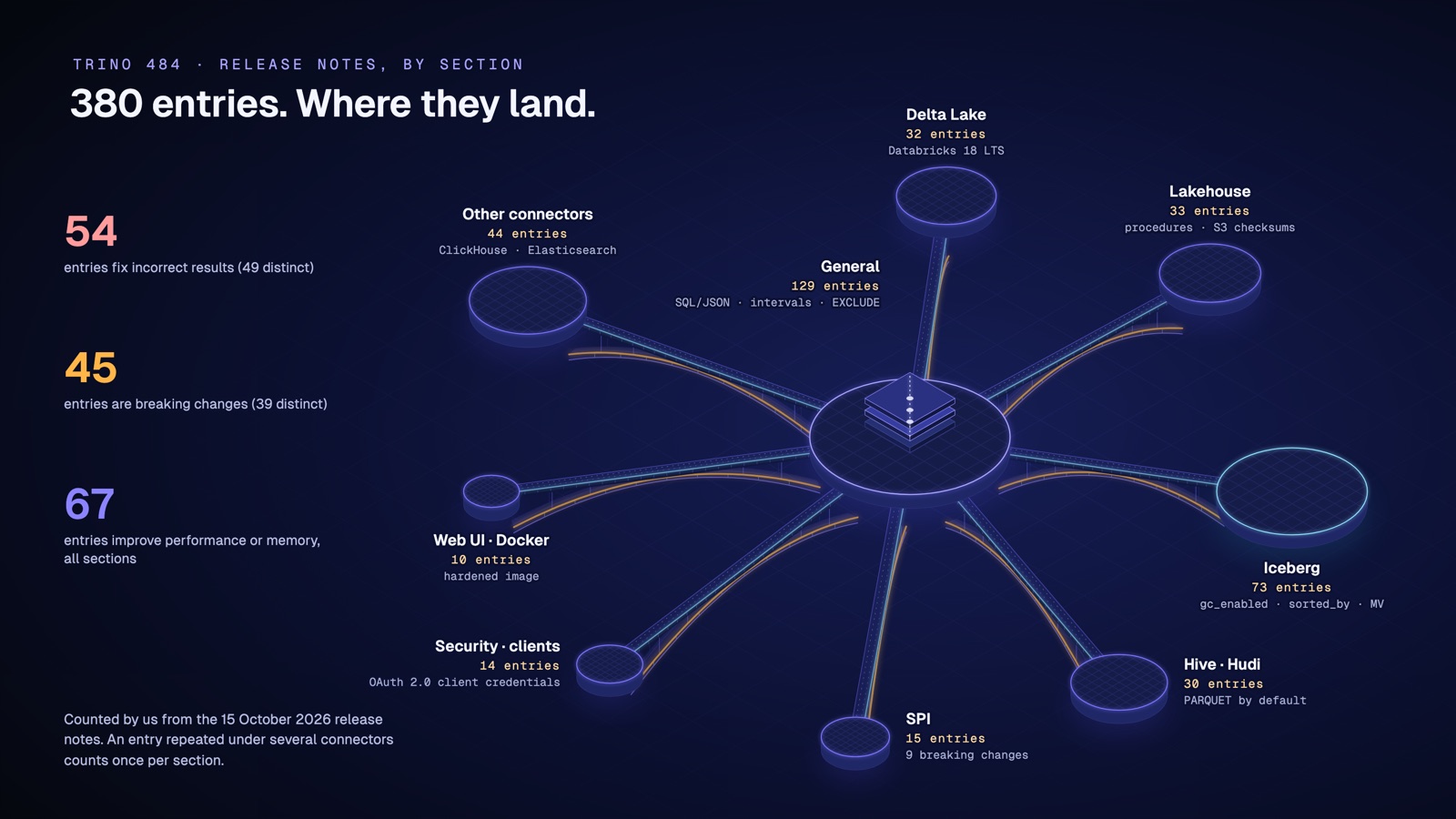
The map groups the 380 release-note entries by section. The same fix often appears under several connectors. By our count, 54 entries fix incorrect results, which is 49 distinct fixes, and 45 entries (39 distinct) are breaking changes.
Set up
Before exploring the changes, install Trino 484 on your machine and load real data. Two steps are enough.
Prerequisites. You have Docker and about 2 GB of free memory. You can write a SELECT with an ORDER BY. No Trino knowledge is needed.
Get the code. Every command and query in this tutorial is collected in two files you can download,
fetch-data.shandqueries.sql.
Step 0 · Run Trino 484 with one command
Trino is a SQL engine that queries your data where it lives. Its official image starts a full server, with a memory catalog that keeps tables in memory.
Start the container in the background, with at most 2 GB of memory.
$ docker run -d --name t484-tuto --memory 2g trinodb/trino:484<container id, 64 characters>Docker prints the container id. This loop waits until the server writes SERVER STARTED in its logs.
$ until docker logs t484-tuto 2>&1 | grep -q "SERVER STARTED"; do sleep 2; done; echo "Trino is ready"Trino is readyCheck that it answers, with the trino CLI that ships in the image.
$ docker exec t484-tuto trino --execute "SELECT 1""1"With --execute, the CLI prints quoted CSV by default. Your Trino 484 is running.
If it doesn’t work.
docker logs t484-tutoshows the cause. Most often Docker is short of memory: free some, or raise the memory given to Docker (the Resources setting in Docker Desktop).
Step 1 · Load the communes of the Rhône
France’s administrative boundaries API (geo.api.gouv.fr) publishes INSEE’s official geographic codes. INSEE is the French national statistics office. For département 69, the API returns 266 communes. Each one has a name (nom), an INSEE code, a population, an array of postal codes (codesPostaux) and a GeoJSON point (centre). The API’s page on data.gouv.fr states that “all the data used is under Open Data licences”.
Download the response, then count its bytes.
$ curl -s "https://geo.api.gouv.fr/departements/69/communes?fields=nom,code,codesPostaux,population,codeEpci,centre&format=json" -o communes-69.json
$ wc -c < communes-69.json43024The file was 43,024 bytes as of 16 October 2026. On macOS, wc pads the number with spaces. If the API has been updated since, this number changes, and so do a few figures below.
Next, write a small SQL script that stores the whole document in a json column. sed doubles every single quote (as in L’Arbresle) so the SQL string literal stays valid.
$ { printf "CREATE TABLE memory.default.communes_69 AS SELECT JSON '"; sed "s/'/''/g" communes-69.json; printf "' AS doc;\n"; } > load.sql
$ docker exec -i t484-tuto trino < load.sql
CREATE TABLE: 1 rowThe table memory.default.communes_69 holds one row: the whole document, in the doc column.
If it doesn’t work. If
curlreturns nothing, check your internet access. The API is public and needs no key.
Now open the interactive CLI. The queries that follow go at its trino> prompt.
$ docker exec -it t484-tuto trinoNote. Under each result, the CLI adds a line of statistics (query id, number of splits). We leave it out of the outputs below.
Change 1 · JSON_TABLE finally reads the JSON type
What changes.
- Before 484. JSON_TABLE, JSON_VALUE, JSON_QUERY and JSON_EXISTS rejected a json column. You had to convert it to text with
json_formatfirst.- With 484. They read it directly, and NESTED PATH works with no conversion.
- Why it matters. Read an API response as a table, with no conversion step.
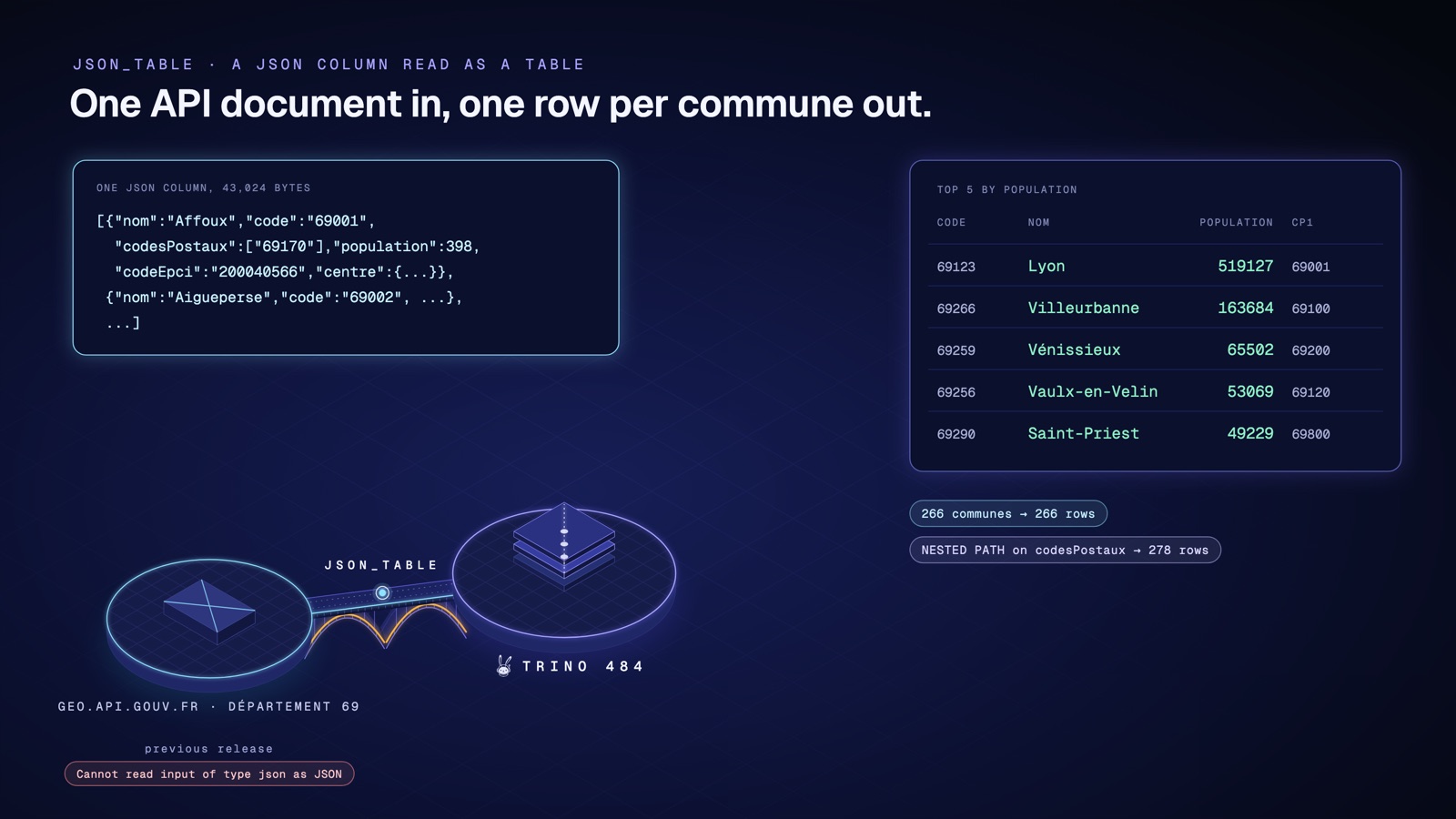
According to the release notes, JSON_TABLE, JSON_VALUE, JSON_QUERY and JSON_EXISTS now accept the json type. Before, they only accepted text.
Step 2 · One row per commune
Split the document into rows and keep the five most populous communes.
trino> SELECT c.code, c.nom, c.population, c.cp1
       FROM memory.default.communes_69 AS g,
            JSON_TABLE(g.doc, 'lax $[*]' COLUMNS (
              code varchar PATH 'lax $.code',
              nom varchar PATH 'lax $.nom',
              population integer PATH 'lax $.population',
              cp1 varchar PATH 'lax $.codesPostaux[0]')) AS c
       ORDER BY c.population DESC
       LIMIT 5;
code | nom | population | cp1
-------+----------------+------------+-------
69123 | Lyon | 519127 | 69001
69266 | Villeurbanne | 163684 | 69100
69259 | Vénissieux | 65502 | 69200
69256 | Vaulx-en-Velin | 53069 | 69120
69290 | Saint-Priest | 49229 | 69800
(5 rows)'lax $[*]' walks each element of the array, and each PATH fills a column. Lyon comes first, with 519,127 inhabitants.
If it doesn’t work. If Trino answers
Table 'memory.default.communes_69' does not exist, run step 1 again. Thememorycatalog keeps its tables in memory, and they vanish when the container restarts.
We checked. On the previous release, the same query fails with
Cannot read input of type json as JSON using formatting JSON. It runs on both releases once you writejson_format(g.doc), which round-trips through varchar.
Step 3 · One row per postal code
A commune can have several postal codes. NESTED PATH flattens that array, one row per code.
trino> SELECT c.nom, c.cp
       FROM memory.default.communes_69 AS g,
            JSON_TABLE(g.doc, 'lax $[*]' COLUMNS (
              nom varchar PATH 'lax $.nom',
              NESTED PATH 'lax $.codesPostaux[*]' COLUMNS (cp varchar PATH 'lax $'))) AS c
       WHERE c.nom = 'Oullins-Pierre-Bénite'
       ORDER BY c.cp;
nom | cp
-----------------------+-------
Oullins-Pierre-Bénite | 69310
Oullins-Pierre-Bénite | 69600
(2 rows)Oullins-Pierre-Bénite has two postal codes, so two rows. Lyon has nine, from 69001 to 69009. Across the whole document, you get 278 rows for 266 communes.
If it doesn’t work. If the query returns no row, check the exact spelling of the name, with its accents and hyphens.
Step 4 · A real number, ready to sum
JSON_VALUE reads a single value. With RETURNING integer, it returns an integer instead of text.
trino> SELECT sum(JSON_VALUE(c, 'lax $.population' RETURNING integer)) AS total_population
       FROM memory.default.communes_69 AS g
       CROSS JOIN UNNEST(CAST(g.doc AS array(json))) AS u(c);
total_population
------------------
1914667
(1 row)UNNEST turns the array into one row per commune, then sum() adds up the 266 populations. The previous release rejects the query, with the same error as in step 2.
If it doesn’t work. If the total differs, the API has probably been updated. Compare the file size with step 1.
Tip. JSON_SERIALIZE and json_scalar() are new too, and JSON can now be cast to DATE:
CAST(JSON '"2026-10-15"' AS date).
Change 2 · JSON keeps its order and its numbers
What changes.
- Before 484. Trino sorted keys alphabetically, and
4.4116became4.4116E0.- With 484. Keys keep the order of the source, and numbers keep their notation.
- Why it matters. Round-trip a document unchanged.
- Warning. This is a breaking change: check your tests.
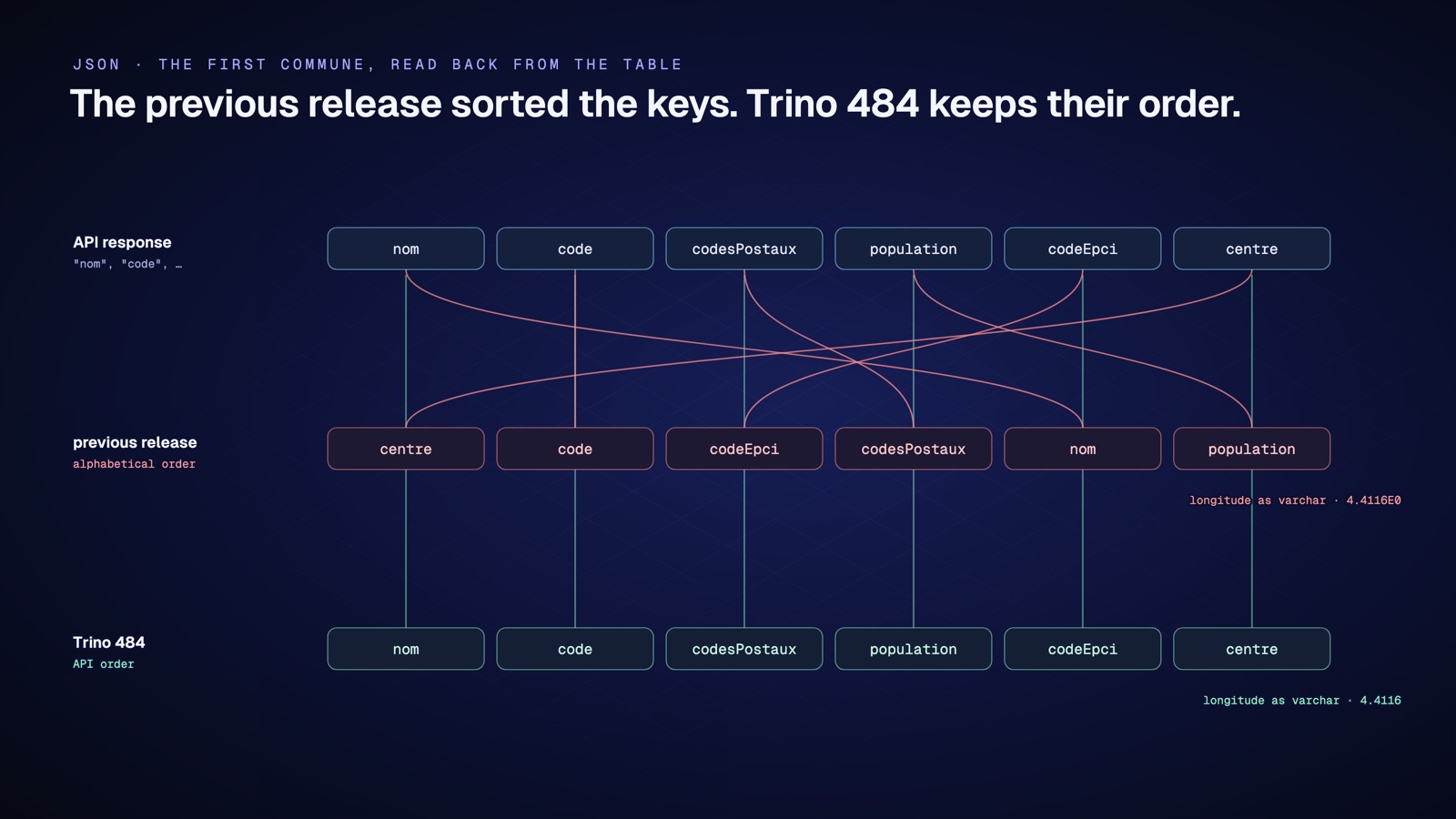
Trino 484 returns JSON documents exactly as they arrived: same key order, same number notation. The previous release sorted the keys and rewrote some numbers in scientific notation.
Step 5 · Read the first commune back
Read back the first commune of the document, then its longitude.
trino> SELECT json_format(json_extract(doc, '$[0]')) AS first_commune
       FROM memory.default.communes_69;
first_commune
-----------------------------------------------------------------------------------------------------------------------------------------------------------
{"nom":"Affoux","code":"69001","codesPostaux":["69170"],"population":398,"codeEpci":"200040566","centre":{"type":"Point","coordinates":[4.4116,45.8448]}}
(1 row)The keys come out in the API’s order: nom, code, codesPostaux, and so on. The previous release returned {"centre":...,"code":"69001",...,"nom":"Affoux","population":398}, keys sorted.
trino> SELECT CAST(json_extract(doc, '$[0].centre.coordinates[0]') AS varchar) AS longitude
       FROM memory.default.communes_69;
longitude
-----------
4.4116
(1 row)The longitude stays 4.4116. The previous release returned 4.4116E0, in scientific notation.
If it doesn’t work. If the keys come out sorted, check the server version with
SELECT version(). It should print 484.
Warning. These are breaking changes. A test that compared the old output will fail. According to the release notes, duplicate keys are kept too. We also checked that
json_array_get('["a", "b"]', 0)now returns"a"instead ofa.
Change 3 · Intervals with a precise type
What changes.
- Before 484. A timestamp subtraction rejected
HOUR TO MINUTE, andhour(INTERVAL '36' HOUR)returned 12.- With 484. You choose the interval fields, with up to 12 fractional-second digits. When HOUR is the leading field,
hour()returns it in full: 36.- Why it matters. Express a duration in the units your business uses.
- Warning. This is a breaking change for
hour()and EXTRACT.
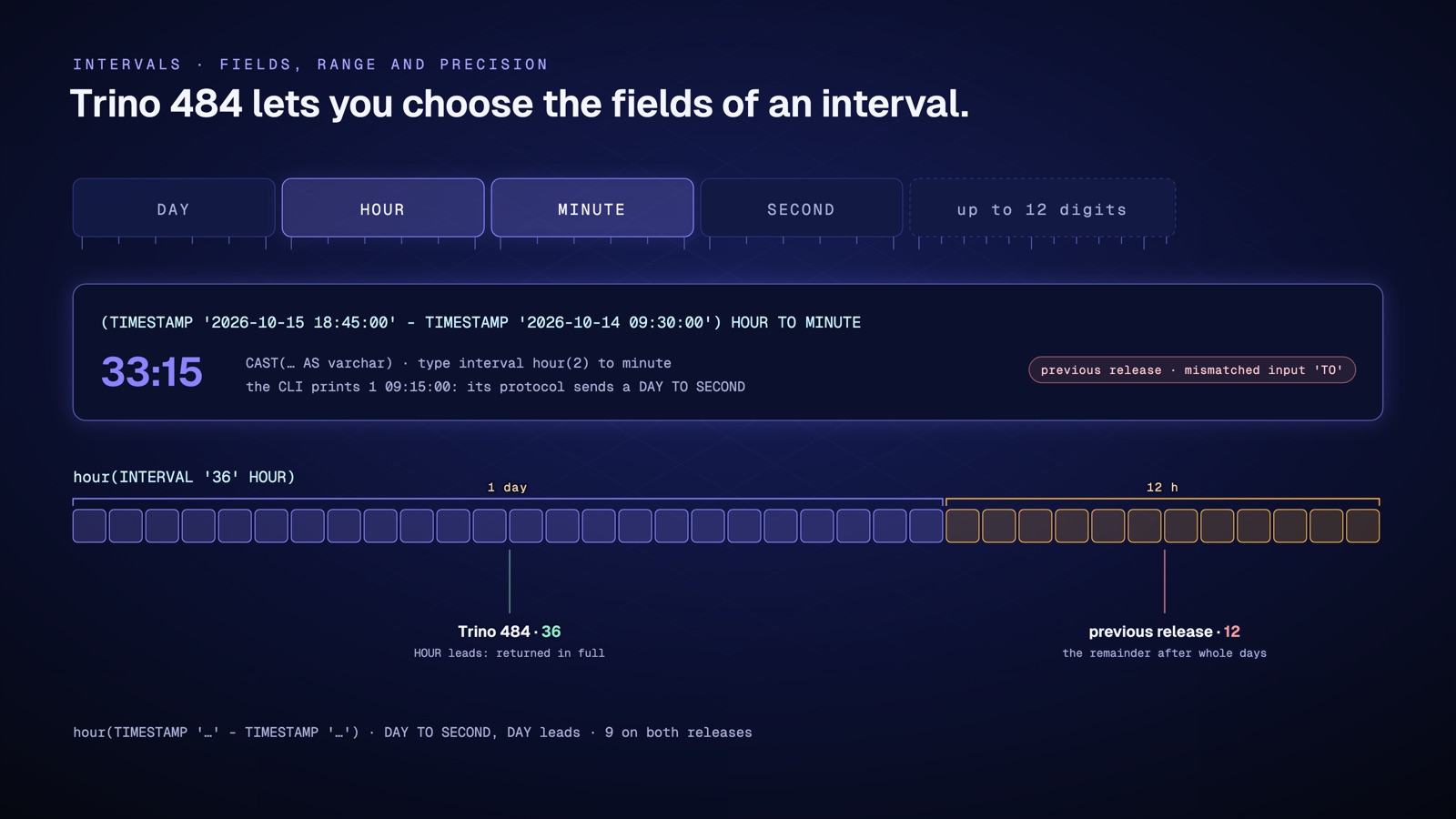
In SQL, a duration is an interval, such as 3 days or 2 hours. Its fields set its units: DAY, HOUR, MINUTE and SECOND for a duration in days and hours. Trino 484 lets you choose those fields, for example hours and minutes for the run time of a job.
Step 6 · Subtract two timestamps as HOUR TO MINUTE
This query subtracts two timestamps and asks for an HOUR TO MINUTE interval. It also extracts the hours of a 36-hour interval.
trino> SELECT (TIMESTAMP '2026-10-15 18:45:00' - TIMESTAMP '2026-10-14 09:30:00') HOUR TO MINUTE AS duration,
              hour(INTERVAL '36' HOUR) AS hours;
duration | hours
------------+-------
1 09:15:00 | 36
(1 row)hour() does return 36: when HOUR is the leading field of the interval, Trino 484 returns it in full. The duration, though, prints as 1 09:15:00: one day, 9 hours and 15 minutes. The CLI seems to ignore the fields you asked for.
It does not. Trino’s client protocol, which the CLI and the JDBC driver use, still sends every day-time interval as DAY TO SECOND. The column type really is HOUR TO MINUTE. Check it.
trino> SELECT typeof(duration) AS type, CAST(duration AS varchar) AS text, hour(duration) AS hours
       FROM (SELECT (TIMESTAMP '2026-10-15 18:45:00' - TIMESTAMP '2026-10-14 09:30:00') HOUR TO MINUTE AS duration);
type | text | hours
----------------------------+-------+-------
interval hour(2) to minute | 33:15 | 33
(1 row)typeof() returns interval hour(2) to minute. Cast to varchar, the interval reads 33:15, that is 33 hours and 15 minutes, and hour() returns 33. To show 33:15 in a tool connected over JDBC, cast the interval to varchar.
Finally, nothing changes on a DAY TO SECOND interval. That is the type a plain timestamp subtraction returns.
trino> SELECT hour(TIMESTAMP '2026-10-15 18:45:00' - TIMESTAMP '2026-10-14 09:30:00') AS hour_of_day; hour_of_day
-------------
9
(1 row)Here the leading field is DAY, so hour() returns the hour of the day, 9, as on the previous release.
If it doesn’t work. If Trino answers
mismatched input 'TO', the server is not on 484.
Warning. The previous release rejected
HOUR TO MINUTE(mismatched input 'TO') and returned 12 forhour(INTERVAL '36' HOUR), the remainder after whole days. Only intervals whose leading field is HOUR, MINUTE, SECOND or MONTH return a different result. Look in your queries for literals such asINTERVAL '36' HOURorINTERVAL '14' MONTH, and for the calculations built on them, such asINTERVAL '30' HOUR * 2.
Note. Trino 484 also accepts a precision on the leading field, as in
INTERVAL '400' DAY(3), and up to 12 fractional-second digits, as inSECOND(1, 12). The previous release rejected both.
Change 4 · CREATE VIEW IF NOT EXISTS protects the existing view
What changes.
- Before 484. CREATE VIEW failed when the view existed, and CREATE OR REPLACE VIEW overwrote it.
- With 484.
IF NOT EXISTScreates the view when it is missing, and leaves an existing one alone.- Why it matters. Rerun a deployment script with no risk of overwriting a view.
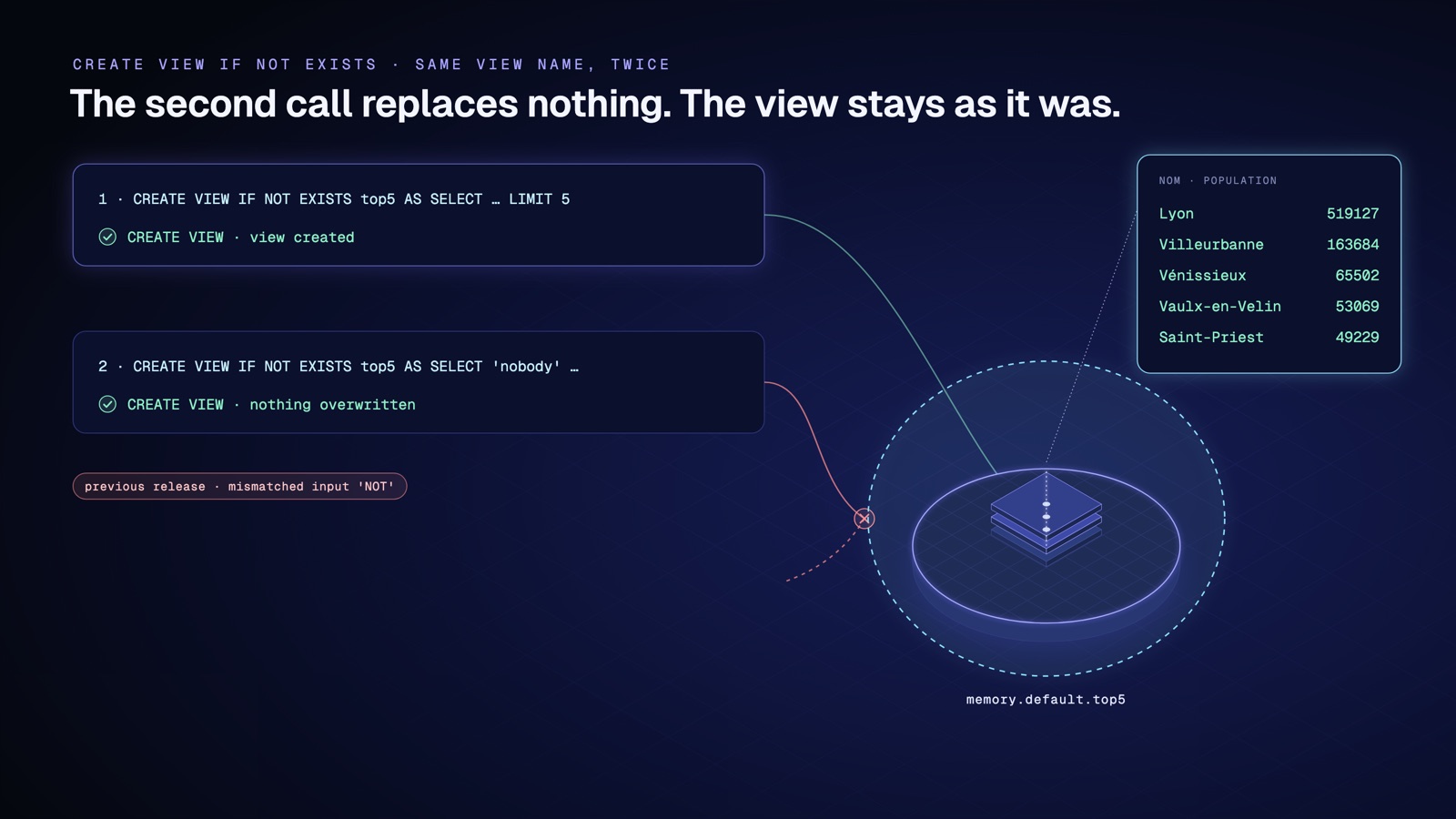
A view is a named query that you read like a table. With IF NOT EXISTS, CREATE VIEW creates it only when it is missing.
Step 7 · A view of the five largest communes
Create a view of the five most populous communes.
trino> CREATE VIEW IF NOT EXISTS memory.default.top5 AS
       SELECT c.nom, c.population
       FROM memory.default.communes_69 AS g,
            JSON_TABLE(g.doc, 'lax $[*]' COLUMNS (
              nom varchar PATH 'lax $.nom',
              population integer PATH 'lax $.population')) AS c
       ORDER BY c.population DESC
       LIMIT 5;
CREATE VIEWRun it again with another definition, as if a deployment script ran twice by mistake.
trino> CREATE VIEW IF NOT EXISTS memory.default.top5 AS SELECT 'nobody' AS nom, 0 AS population;CREATE VIEWTrino answers with no error. Read the view to see which of the two definitions won.
trino> SELECT nom, population FROM memory.default.top5 ORDER BY population DESC; nom | population
----------------+------------
Lyon | 519127
Villeurbanne | 163684
Vénissieux | 65502
Vaulx-en-Velin | 53069
Saint-Priest | 49229
(5 rows)The first definition is intact. The second call overwrote nothing.
If it doesn’t work. If the second call fails with a view-exists error, check that it does say
IF NOT EXISTS.
We checked. The previous release rejects the syntax, with
mismatched input 'NOT'. You had to choose between CREATE VIEW, which fails when the view exists, and CREATE OR REPLACE VIEW, which overwrites it.
Change 5 · EXCLUDE compares a row with the others
What changes.
- Before 484. The EXCLUDE clause was rejected. You had to compute the average of the others by hand.
- With 484. EXCLUDE is accepted. EXCLUDE CURRENT ROW drops the current row. EXCLUDE GROUP drops the current row and its peers, the rows that tie on the window’s ORDER BY. EXCLUDE TIES drops the peers but keeps the current row.
- Why it matters. Compare a row with the average of the others, in a single window function.
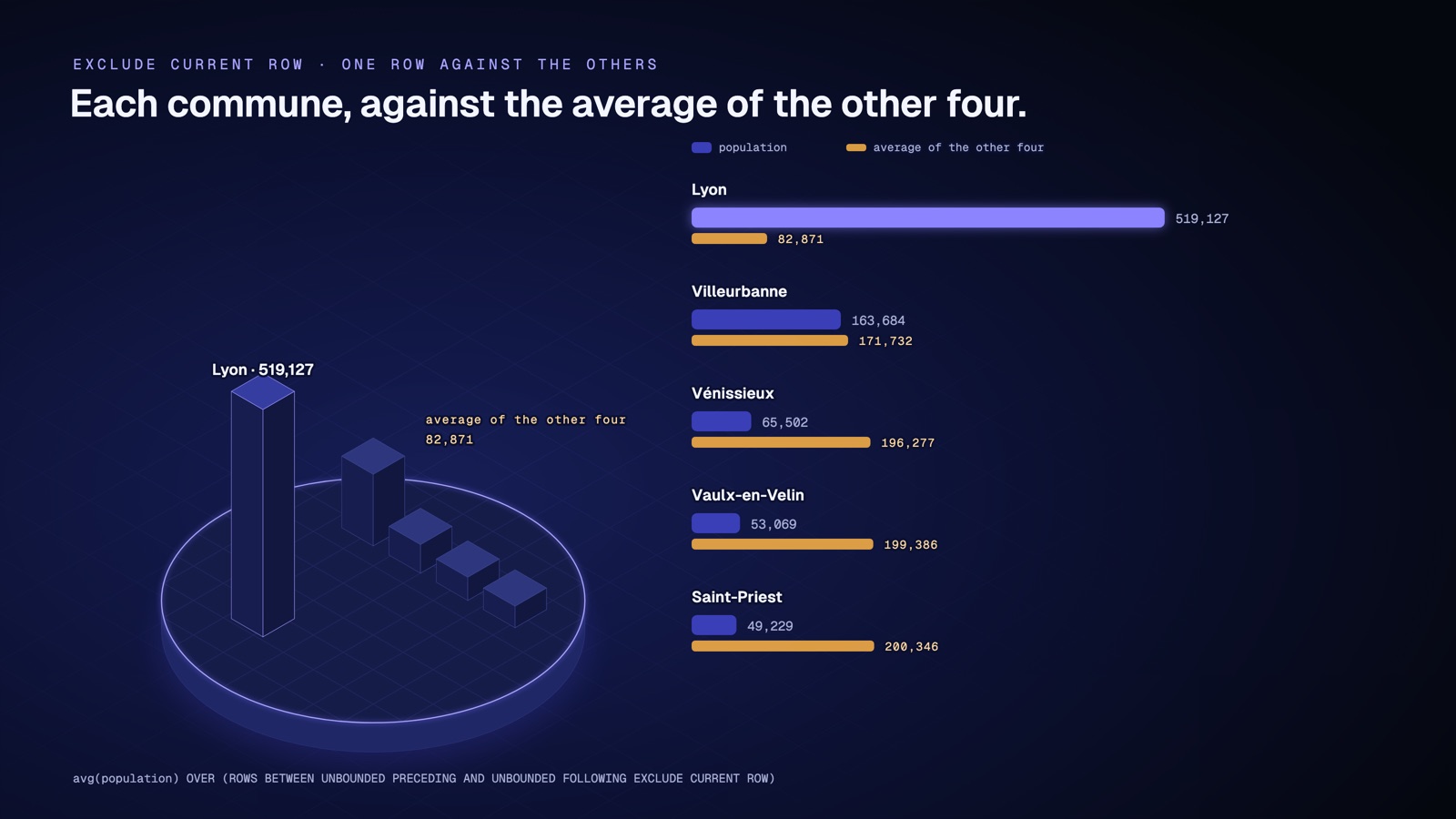
A window function computes a value over a set of rows, the window frame. EXCLUDE removes some rows from that frame. With EXCLUDE CURRENT ROW, each row is compared with the average of the others, without its own value.
Step 8 · Each commune against the other four
For each commune in the view, compute the average population of the other four.
trino> SELECT nom, population,
              round(avg(population) OVER (
                ROWS BETWEEN UNBOUNDED PRECEDING AND UNBOUNDED FOLLOWING
                EXCLUDE CURRENT ROW)) AS avg_of_others
       FROM memory.default.top5
       ORDER BY population DESC;
nom | population | avg_of_others
----------------+------------+---------------
Lyon | 519127 | 82871.0
Villeurbanne | 163684 | 171732.0
Vénissieux | 65502 | 196277.0
Vaulx-en-Velin | 53069 | 199386.0
Saint-Priest | 49229 | 200346.0
(5 rows)Lyon has 519,127 inhabitants, against an average of 82,871 for the other four. Without EXCLUDE, Lyon’s average would include Lyon itself.
If it doesn’t work. If Trino answers
Table 'memory.default.top5' does not exist, run step 7 again.
Note. EXCLUDE GROUP and EXCLUDE TIES rely on the window’s ORDER BY. Without an ORDER BY, as in step 8, every row is a peer of every other, so EXCLUDE GROUP would return NULL on every row. The previous release rejects the clause, with
mismatched input 'EXCLUDE'.
Change 6 · Wrong results fixed
What changes.
- Before 484. With a list of consecutive values that contains NULL,
x NOT IN (1, 2, 3, NULL)returnedtruefor x = 5. A bigint running sum also overflowed with no error.- With 484. Trino returns NULL, as standard SQL requires, and reports the overflow as an error.
- Why it matters. Get correct results. A query may now return NULL or an error where it used to return a wrong number.
Trino 484 fixes queries that returned a wrong answer with no error. Those are the dangerous ones: nothing tells you to look.
Step 9 · NOT IN with a NULL in the list
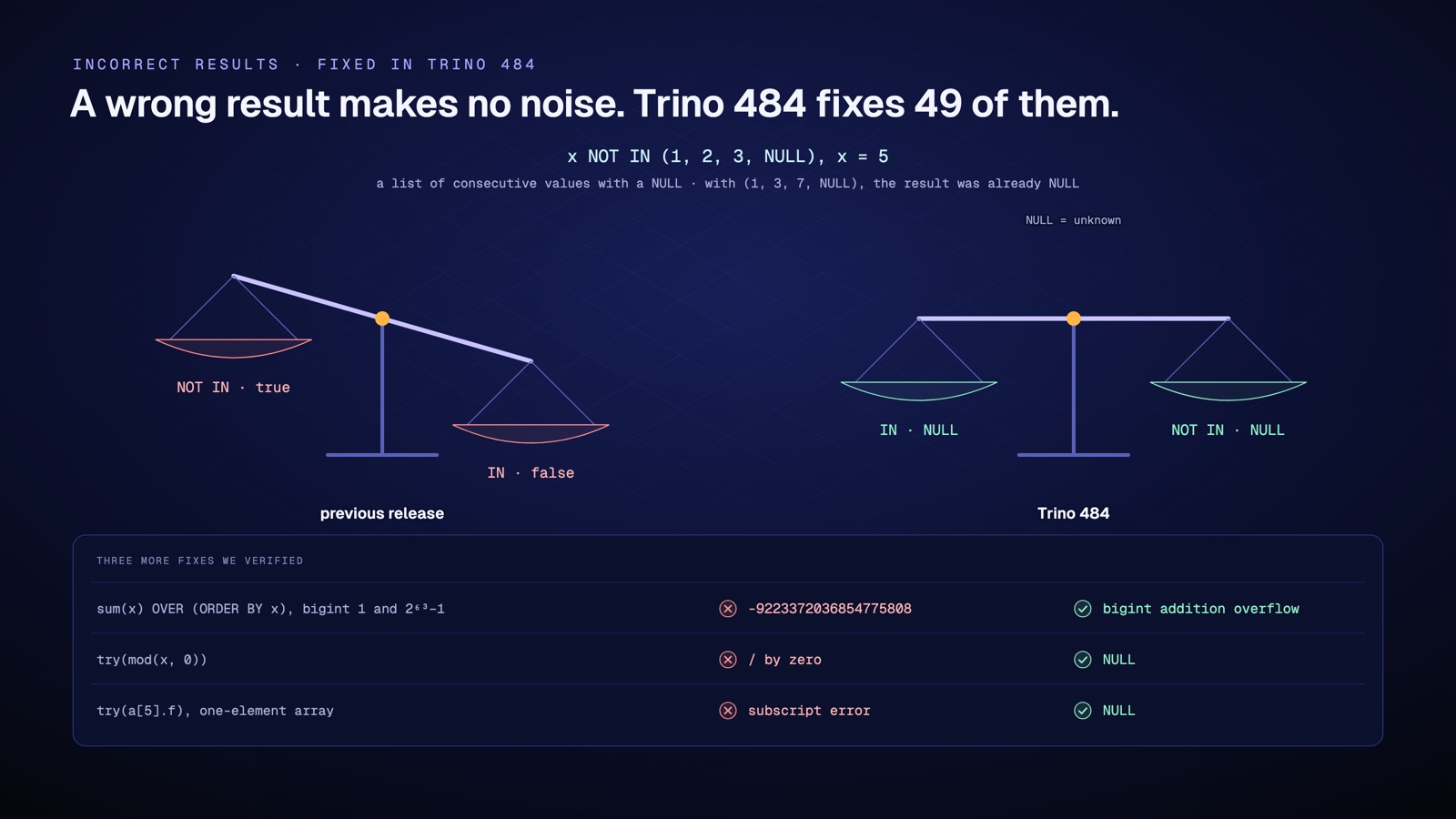
In SQL, 5 NOT IN (1, 2, 3, NULL) is NULL: Trino cannot know whether 5 equals the unknown value. The previous release got this wrong when the list held consecutive values, such as 1, 2, 3. Try it.
trino> SELECT x, x IN (1, 2, 3, NULL) AS in_list, x NOT IN (1, 2, 3, NULL) AS not_in_list
       FROM (VALUES 2, 5) AS t(x)
       ORDER BY x;
x | in_list | not_in_list
---+---------+-------------
2 | true | false
5 | NULL | NULL
(2 rows)For x = 5, Trino 484 returns NULL in both columns, as the standard requires. In a WHERE clause, the row is therefore dropped.
If it doesn’t work. If you see
falseandtruefor x = 5, your server does not have the fix yet.
We checked. The same query returned
falseandtruefor x = 5 on the previous release. With a list of non-consecutive values, such as(1, 3, 7, NULL), the result was already NULL. The diagram shows three other fixes we verified.
Change 7 · Iceberg accepts sorted_by and gc_enabled
What changes.
- Before 484. The
optimizeprocedure rejectedsorted_by, thegc_enabledproperty did not exist, and materialized views accepted neither COMMENT nor optimize.- With 484. All four statements are accepted. In our test, on a small table,
optimizerewrote no files, so the sort was not exercised.- Why it matters. Sort by the column you filter on most and, according to the release notes, protect files that another engine reads.
Iceberg is a widely used table format for data stored in files. Compaction merges its small files into larger ones. Trino 484 accepts a sort order during that compaction. According to the release notes, it can also protect a table’s files from deletion.
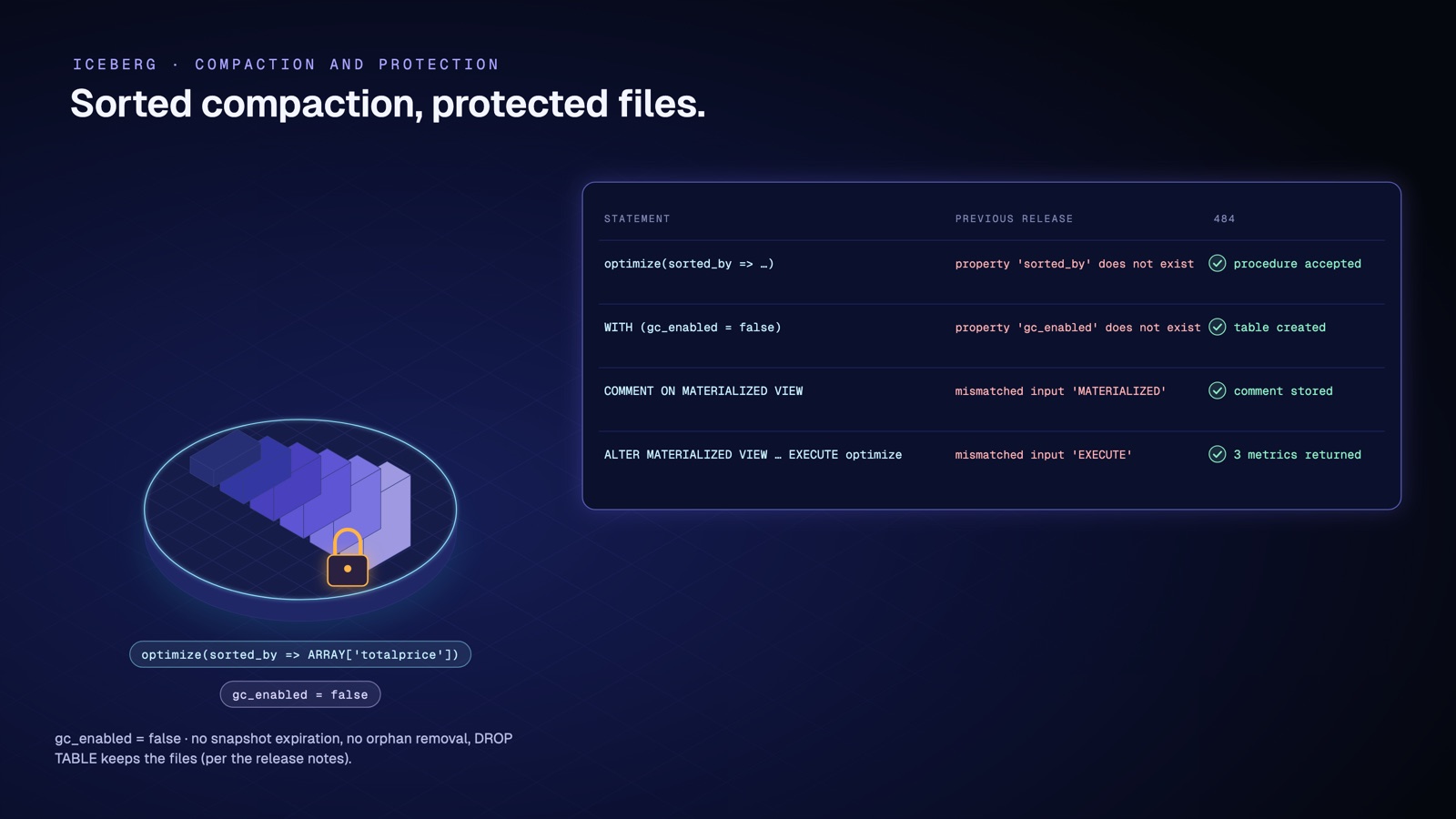
The official image has no Iceberg catalog. So we tested this part separately, against a local Iceberg catalog.
| Statement | Previous release | Trino 484 |
|---|---|---|
optimize(sorted_by => ARRAY['totalprice']) |
property 'sorted_by' does not exist |
procedure accepted, three metrics returned |
WITH (gc_enabled = false) |
table property 'gc_enabled' does not exist |
table created |
COMMENT ON MATERIALIZED VIEW |
mismatched input 'MATERIALIZED' |
comment stored |
ALTER MATERIALIZED VIEW ... EXECUTE optimize |
mismatched input 'EXECUTE' |
three metrics returned |
According to the release notes, gc_enabled = false stops snapshot expiration, orphan file removal and DROP TABLE from deleting files.
Tutorial recap
You ran ten steps, 0 to 9, on real public data.
| Step | What you did | What’s new in Trino 484 |
|---|---|---|
| 0 and 1 | started Trino and loaded 266 communes | nothing, setup |
| 2 to 4 | read the JSON as a table, flattened the postal codes, summed the populations | JSON_TABLE, JSON_VALUE on the json type |
| 5 | read a commune and its longitude back | key order and numbers kept |
| 6 | subtracted two timestamps as HOUR TO MINUTE, then checked the type | precise intervals |
| 7 | created a view without overwriting it | CREATE VIEW IF NOT EXISTS |
| 8 | compared each commune with the others | EXCLUDE CURRENT ROW |
| 9 | saw NOT IN return NULL | wrong result fixed |
Leave the CLI with quit, then remove the container and the files.
$ docker rm -f t484-tuto
$ rm communes-69.json load.sqlt484-tutoDocker confirms the removal by printing the container name. Before you move your own cluster to Trino 484, read Before you upgrade.
Also in 484
We also verified four operational changes. query.max-output-data-size stops a query that returns too much data (EXCEEDED_OUTPUT_LIMIT). The CLI and the JDBC driver now support the OAuth 2.0 client credentials flow. In file-based access control, {user} gives each user their own schema. Trino can forward an allowlist of extra credentials to OPA, and nothing else.
The release notes also list a file cache shared by all catalogs, and 25 performance or memory entries in the general section (67 across all sections), which we did not measure.
Before you upgrade
- The Docker image has a new base. It now runs on the Red Hat Hardened core runtime image. We found
grep,sed,awkandfindmissing, and therun-trinoscript gone. Withoutnode.idin yournode.properties, the node gets a new UUID on every start. The release notes give the fix,node.id=${ENV:HOSTNAME}. - User names are now case-sensitive in GRANT, REVOKE, SET AUTHORIZATION and CREATE SCHEMA. Role names are still lowercased. We checked it: after
GRANT ... TO USER Alice, Alice reads the table and alice is denied. - JSON output changes. Keys, duplicates and decimal notation are kept. According to the release notes, numbers stay numbers in JSON_ARRAY and JSON_OBJECT, nesting is capped at 1,024 levels, and JSON_SERIALIZE becomes a reserved word.
- So do intervals. When the leading field of an interval is HOUR, MINUTE, SECOND or MONTH, the function that extracts it returns it in full: 36 for
hour(INTERVAL '36' HOUR), not 12. On a DAY TO SECOND interval, such asend - start, nothing changes:hour()still returns the hour of the day. Look forINTERVAL '...' HOUR,MINUTE,SECONDorMONTHliterals that overflow the next unit, and for the calculations built on them. EXTRACT now fails on a field the interval type does not contain, and a day-time interval tops out at about 292,000 years. - Hive and Iceberg.
hive.storage-formatnow defaults to PARQUET, thefs.cache.*settings move to the cache manager (catalogs keep onlyfs.cache.enabled), and the$snapshots,$historyand$metadata_log_entriestables return their timestamps in UTC. - Custom plugins. Several SPI changes require a rebuild.
- Platforms. The ppc64le image is gone, and the Cassandra connector requires Cassandra 4.0 or later.
Test yourself
1. Why does the step 2 query fail on the previous release?
The doc column is of type json, and JSON_TABLE only accepted text. You had to write json_format(g.doc).
2. What does hour(INTERVAL '36' HOUR) return on Trino 484?
36, because HOUR is the leading field of the interval. The previous release returned 12, the remainder after one whole day.
3. What is 5 NOT IN (1, 2, 3, NULL)?
NULL. Trino cannot rule out that the unknown value is 5. In a WHERE clause, the row is dropped.
What you’ve learned
In this tutorial, you’ve learned how to:
- run Trino 484 on your machine with one command;
- read a JSON API response as a table, with JSON_TABLE;
- flatten a nested array into rows, with NESTED PATH;
- subtract two timestamps and choose the fields of the resulting interval;
- create a view without overwriting the one that exists;
- compare a row with the average of the others, with EXCLUDE;
- spot a wrong result that Trino 484 fixes.
To go further, read the Trino 484 release notes, browse the JSON functions documentation, and reread Before you upgrade before you move a cluster.
Frequently asked questions
What's new in Trino 484?
Trino 484, released on 15 October 2026, completes standard SQL/JSON: JSON_TABLE and JSON_VALUE accept the json type, and JSON_SERIALIZE and json_scalar() are new. It adds precise intervals with up to 12 fractional digits, the EXCLUDE clause in window frames, CREATE VIEW IF NOT EXISTS, and for Iceberg, COMMENT and optimize on materialized views, the sorted_by option for optimize and the gc_enabled table property. Its release notes contain 380 entries, including 54 incorrect-result entries (49 distinct) and 45 breaking changes (39 distinct).
When was Trino 484 released?
On 15 October 2026, according to its release notes.
Does Trino support JSON_TABLE and JSON_SERIALIZE?
Yes. JSON_TABLE already worked on text. Since 484 it also accepts a json value, and the JSON_SERIALIZE function, the json_scalar() function and the JSON(...) constructor are new.
How do I compute an average that excludes the current row in Trino?
Use EXCLUDE CURRENT ROW in the window frame, available since 484.
Why does my Trino 484 Docker container have a random node ID?
The run-trino script, which used the container hostname as the node ID, is gone. Add node.id=${ENV:HOSTNAME} to your node.properties.
Does Trino 484 fix incorrect results?
Yes. We counted 54 entries that mention fixed "incorrect results", 49 distinct fixes, with 31 entries in the general section. Our rule: an entry counts if it contains "incorrect results", "incorrect query results" or "incorrect NULL results".