


The open source core
The core of akko-mcp-trino, under the Apache 2.0 licence, gives an AI agent read-only MCP access to Trino, under a configured identity or under each user's own.
The core of akko-mcp-trino is an MCP server for Trino, under the Apache 2.0 licence, at version 0.5.3. It gives an AI agent six tools to explore a Trino and read data from it, with a read-only guard decided on the SQL tree, bounds on every call and one audit line per call. Every query runs either under the identity the administrator configures, or under the identity of the user the agent works for, whose token Trino verifies itself. Either way, Trino and its policy engine decide what the agent may read.
The core, and what AKKO and ARCHE deliver
| Open source core | In AKKO and ARCHE | |
|---|---|---|
| Identity in Trino | an identity configured by the administrator, or each user’s own when Trino trusts the same identity provider | the same, and other ways to carry the user’s identity |
| Read-only on the SQL tree | yes | yes |
| Row and time bounds | yes | yes |
| Traces | one audit line per call, naming the caller | an audit linked to the engine’s log |
| Tools | six tools to explore and read | the same, and further tools |
| Business context of the catalogue | no | yes, never describing what the person cannot see |
| Agent and access management | no | yes |
| Enterprise operations | up to you | installed and monitored with the platform |
The core suits an agent that reads under an account whose rights your rules bound, as well as agents that each read under the person’s own rights, on a Trino that verifies the tokens of your identity provider. The overview describes the complete server.
Install
pip install akko-mcp-trino        # or: pipx install akko-mcp-trino
uvx akko-mcp-trino --version      # without installing, the way most MCP hosts do
You can also install it from source.
git clone https://github.com/AKKO-p/akko-mcp-trino.git
cd akko-mcp-trino
python -m venv .venv && source .venv/bin/activate
pip install -e .
It needs Python 3.12 or later. The package installs a Python module (akko_mcp_trino) and a command (akko-mcp-trino); python -m akko_mcp_trino starts the same server.
In a container
The image is published on Docker Hub, for linux/amd64 and linux/arm64. It runs as a non-root user and carries a health check. It takes the same environment variables, on ports 3000 (MCP) and 3001 (health).
docker run --rm akkoai/akko-mcp-trino:0.5 akko-mcp-trino --version

docker run -d --name akko-mcp-trino -p 3000:3000 -p 3001:3001 \
  -e TRINO_HOST=trino.example.internal -e TRINO_PORT=8443 -e TRINO_HTTP_SCHEME=https \
  -e TRINO_CATALOG=iceberg -e TRINO_IDENTITY_MODE=jwt \
  -e MCP_AUTH_ENABLED=true -e MCP_AUTH_REQUIRED=true \
  -e MCP_JWKS_URL=https://idp.example.com/realms/data/protocol/openid-connect/certs \
  -e MCP_OIDC_ISSUER=https://idp.example.com/realms/data \
  -e MCP_OIDC_AUDIENCE=data-platform \
  akkoai/akko-mcp-trino:0.5
The 0.5 tag follows the latest release of the 0.5 line; 0.5.3 names one release.
The code, the tests and the examples are on GitHub; the changelog tracks every change, and a vulnerability is reported through the security policy.
Get started
The server reads its whole configuration from the environment. Point it at your Trino and at your identity provider, then start it. This example uses the default mode, service, where every query runs as TRINO_USER.
export TRINO_HOST=trino.example.internal
export TRINO_PORT=8443
export TRINO_HTTP_SCHEME=https
export TRINO_CATALOG=iceberg
export TRINO_USER=agent_reader           # the identity the server reads as
export TRINO_PASSWORD=...                # Basic authentication, https only

export MCP_AUTH_ENABLED=true
export MCP_AUTH_REQUIRED=true            # refuse a request without a verified identity
export MCP_JWKS_URL=https://idp.example.com/realms/data/protocol/openid-connect/certs
export MCP_OIDC_ISSUER=https://idp.example.com/realms/data
export MCP_OIDC_AUDIENCE=data-platform

akko-mcp-trino --check                   # the effective configuration, no secret
akko-mcp-trino                           # serves streamable-http on port 3000
--check prints the effective configuration without ever printing a secret, and exits with code 2 if the server would refuse to start. On start, the server writes a line like this one.
INFO:__main__:serving transport=streamable-http port=3000 auth=True strict=True extensions=noneThree endpoints then let you watch the server, on the health port.
curl -s localhost:3001/health    # {"status":"ok"}     never touches Trino
curl -s localhost:3001/ready     # {"status":"ready"}  Trino answers
curl -s localhost:3001/metrics   # Prometheus metrics
/health never touches Trino, so a liveness probe cannot kill the server because Trino is slow. /ready asks Trino according to the identity mode: a bounded SELECT 1 as TRINO_USER in service mode, Trino’s public /v1/info in jwt mode. /metrics exposes mcp_trino_queries_total, mcp_trino_query_errors_total and mcp_trino_query_duration_seconds.
Identity in Trino
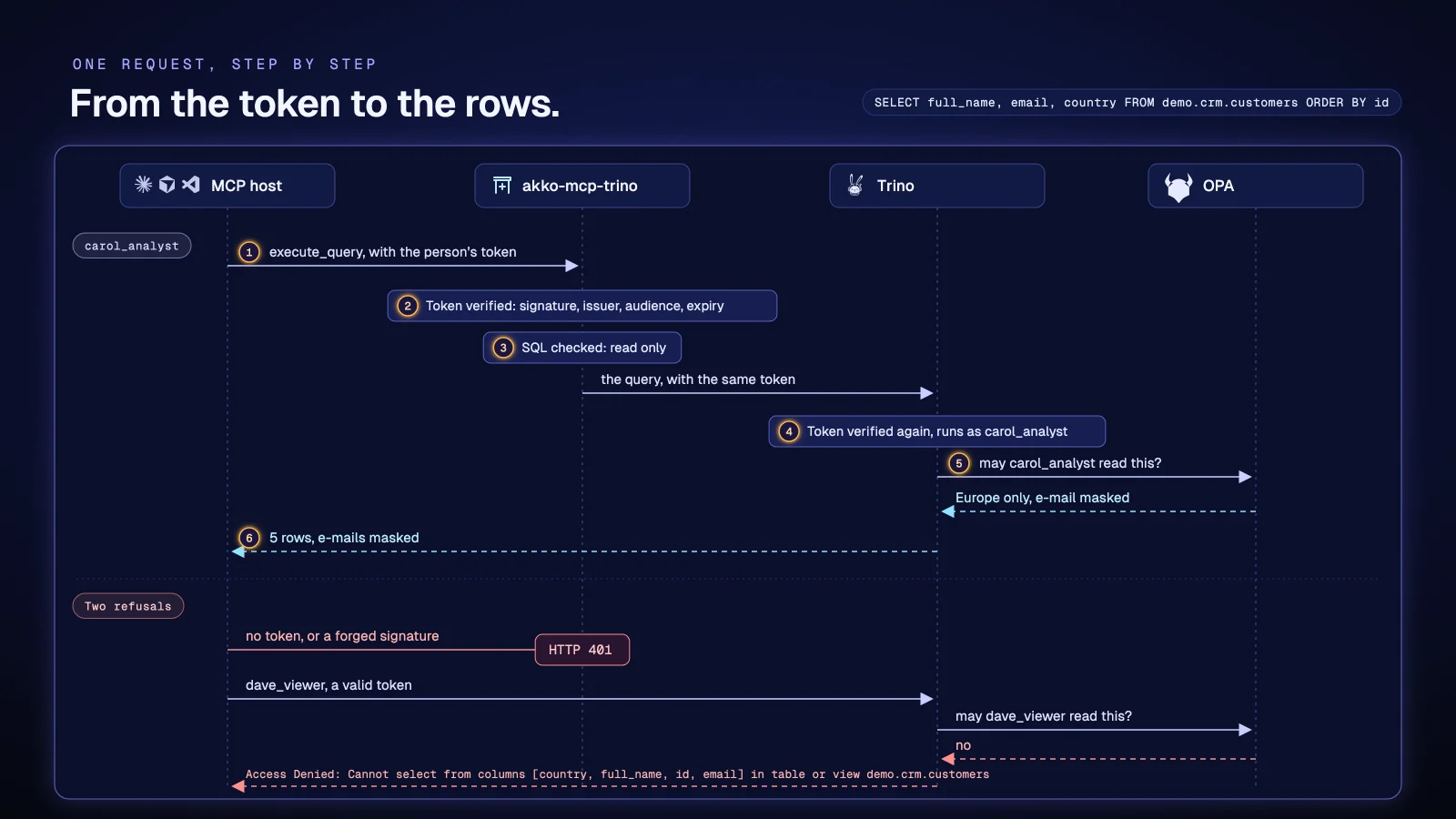
The server first verifies the caller’s token (signature against the provider’s JWKS, issuer, audience, expiry). In strict mode (MCP_AUTH_REQUIRED=true), a request without a verified token is refused before any query. The TRINO_IDENTITY_MODE variable then says under which identity Trino runs it.
| Mode | Who Trino sees | What Trino needs | Who decides |
|---|---|---|---|
service (default) |
TRINO_USER, the same for every caller |
a password, or nothing for a local Trino | the rights of that one identity |
jwt |
the caller, by their own verified token | its JWT authenticator, trusting the same identity provider | the rights of each user |
One configured identity (service)
Every call of every agent using this server reads with the same rights. Give that account a narrow scope in your policy engine (OPA, Ranger or Trino’s own access control): the catalogs, schemas and columns every caller needs, and nothing more. The caller’s token never leaves the server. An identity sent by the caller, in a header for instance, changes nothing.
Each user under their own rights (jwt)
When Trino trusts the same identity provider, let it decide for each person.
export TRINO_IDENTITY_MODE=jwt           # the caller's verified token goes to Trino
export TRINO_HTTP_SCHEME=https           # required: a token never travels over http
export MCP_AUTH_ENABLED=true
export MCP_AUTH_REQUIRED=true
# TRINO_USER and TRINO_PASSWORD are not used
On the Trino side, set http-server.authentication.type=JWT, http-server.authentication.jwt.key-file to the provider’s JWKS URL, and http-server.authentication.jwt.principal-field to the same claim the server reads (preferred_username or sub). required-issuer and required-audience pin the token to your provider and to Trino; the token’s audience must be one Trino accepts.
The server sends Trino the token it has verified, over https only, and never into the audit line. Trino verifies that token again and runs the query under the person’s name: Ranger or OPA decide for that person, with no service account, no password and no right to act for someone else. A request without a verified token is refused; it never runs as TRINO_USER. The server refuses to start in jwt mode over http, and an unknown mode stops it from starting.
This mode has been proven on a real cluster: two accounts ask the same question and get two answers, emails masked for one and in clear for the other; a request without a token and a request with a forged token are refused.
The six tools
| Tool | Arguments | What it returns |
|---|---|---|
list_catalogs |
none | {"catalogs": [...], "truncated": bool}, the visible catalogs |
list_schemas |
catalog |
{"schemas": [...], "truncated": bool}, the schemas in that catalog |
list_tables |
catalog, schema |
{"tables": [...], "truncated": bool}, the tables and views in that schema |
describe_table |
catalog, schema, table, sample_rows (0 to 20) |
the columns, their types and comments, truncated, and a governed sample when asked |
explain_query |
sql |
{"plan": "..."}, the plan of a read-only statement, without running it |
execute_query |
sql, max_rows (optional, lower than the cap) |
{"columns": [...], "rows": [...], "row_count": n, "truncated": bool} |
Every tool goes through Trino under the identity mode, the listing tools included: metadata is data, and Trino lists only what that identity may see. Every tool description is written for a model and says what the tool returns; those of describe_table and execute_query say that a masked value or a missing row is the access policy, not an error to retry. Errors come back to the agent as {"error": "..."}, with Trino’s whole message; a permission refusal is an ordinary error, not a crash.
Read-only
execute_query accepts any SQL Trino accepts, as long as it is a read. The statement is parsed into a syntax tree, and it is refused if it holds more than one statement, or if a write (INSERT, UPDATE, DELETE, MERGE, CREATE, DROP, ALTER, GRANT, CALL, SET) appears anywhere in the tree, CTEs, subqueries and the statement an EXPLAIN explains included. EXPLAIN ANALYZE is refused, since it runs what it explains.
Table functions (TABLE(...)) are refused: a TABLE(pg.system.query(query => '...')) reads like a plain SELECT but sends raw SQL to the source under the connector’s account, outside the engine’s policy. The system catalog is refused too. Every identifier is validated ([A-Za-z_][A-Za-z0-9_-]*) before it enters the SQL. A name without a catalog is read in the session catalog (TRINO_CATALOG): give it a data catalog.
The guard is a second line. The first remains the engine: give the server’s account, or the users, read rights only, and refuse system in your policy. The blog tells how this guard took its shape.
Bounds
| Bound | Variable | Effect |
|---|---|---|
| Row cap | TRINO_MAX_ROWS |
one more row is read to say whether the answer was cut (truncated), and the rest of the query is cancelled in Trino |
| Query budget | TRINO_QUERY_TIMEOUT_SECONDS |
a longer query is cancelled in Trino, and the agent is told so |
| Call budget | MCP_CALL_TIMEOUT_SECONDS |
past it, no query starts, the running one is cancelled, and the agent gets an error rather than a partial answer |
The budget is held by the server, not set as a session property, so that a policy engine that forbids session properties does not refuse every query.
The log
Every response carries an X-Request-Id header: the gateway’s when it is a plain token, otherwise a generated one. Every tool call writes one JSON line to the mcp.audit logger, keyed by that id.
{"request_id":"edge-42","tool":"execute_query","subject":"alice","ok":false,"error":"USER_ERROR:PERMISSION_DENIED","duration_ms":84}With the default logging configuration, the line comes out prefixed with INFO:mcp.audit:; a collector that expects pure JSON strips that prefix. The line says who called which tool, with which outcome and for how long. It has no field that could hold the token or the SQL text. An error appears as a code, never a message, because a message from Trino may quote a value read from a row (Cannot cast '<value>' to INT). The agent reads the whole message. Every refusal carries an X-Reason header; in strict mode, a request without a verified identity gets 401 unauthenticated.
Connect an MCP host
Remotely, the host connects to the server’s address (/mcp over streamable-http, the default transport; /sse for an older host) and sends the user’s access token.
{
  "mcpServers": {
    "trino": {
      "url": "https://mcp.example.internal/mcp",
      "headers": {"Authorization": "Bearer <the user's access token>"}
    }
  }
}
Locally, Claude Desktop, Cursor or Mistral Vibe start the server themselves over stdio. There is no HTTP request: the caller comes from the environment, through the user’s access token in MCP_USER_TOKEN, verified like a header. In strict mode, the server refuses to start without it.
{
  "mcpServers": {
    "trino": {
      "command": "uvx",
      "args": ["akko-mcp-trino"],
      "env": {
        "MCP_TRANSPORT": "stdio",
        "TRINO_HOST": "trino.example.internal", "TRINO_PORT": "8443", "TRINO_HTTP_SCHEME": "https",
        "TRINO_CATALOG": "iceberg", "TRINO_IDENTITY_MODE": "jwt",
        "MCP_AUTH_ENABLED": "true", "MCP_AUTH_REQUIRED": "true",
        "MCP_JWKS_URL": "https://idp.example.com/realms/data/protocol/openid-connect/certs",
        "MCP_OIDC_ISSUER": "https://idp.example.com/realms/data",
        "MCP_OIDC_AUDIENCE": "data-platform",
        "MCP_USER_TOKEN": "<the user's access token>"
      }
    }
  }
}
In service mode, replace TRINO_IDENTITY_MODE with TRINO_USER and TRINO_PASSWORD. Filter the Host header with MCP_ALLOWED_HOSTS when a browser can reach the server.
Extend without modifying
A Python package can add tools or behaviour around the core, without modifying it. It registers under an entry-point group, and the operator names it at start.
[project.entry-points."akko_mcp_trino.tools"]
my-tools = "my_package.tools:register"
export MCP_TOOL_PLUGINS=my-toolsNothing is loaded that is not named, and an unknown name stops the server from starting. An added tool goes through the same client, hence under the same identity mode, with the same read-only guard and the same log line. A broader extension (MCP_EXTENSIONS, group akko_mcp_trino.extensions) can add identity modes, guards at the door, routes or log fields, with one rule: it can refuse, never widen.
Configuration
The whole configuration is read from the environment; nothing is hardcoded.
Trino
| Variable | Role | Default |
|---|---|---|
TRINO_HOST, TRINO_PORT |
the coordinator | localhost, 8080 |
TRINO_HTTP_SCHEME |
http or https; a password or a token is never sent over http |
http |
TRINO_VERIFY |
TLS verification: true, false, or the path to the CA bundle that checks Trino’s TLS chain |
true |
TRINO_IDENTITY_MODE |
service (every query as TRINO_USER) or jwt (every query as the caller, https only); an unknown mode stops the server from starting |
service |
TRINO_USER |
the identity the server reads as in service mode |
trino |
TRINO_PASSWORD |
its password, sent by Basic authentication, refused over http |
none |
TRINO_CATALOG |
the session catalog, where a name without a catalog is read; give it a data catalog | system |
TRINO_READ_ONLY |
refuse writes in execute_query |
true |
TRINO_SOURCE |
the source Trino records for every query | the server name |
TRINO_REQUEST_TIMEOUT_SECONDS |
the timeout of one HTTP request to Trino | 30 |
TRINO_MAX_ROWS, TRINO_QUERY_TIMEOUT_SECONDS, MCP_CALL_TIMEOUT_SECONDS |
the bounds above | 100, 0, 0 |
Identity
| Variable | Role | Default |
|---|---|---|
MCP_AUTH_ENABLED |
verify the callers’ tokens | false |
MCP_AUTH_REQUIRED |
refuse a request without a verified identity | false |
MCP_JWKS_URL |
the provider’s JWKS; required when verification is on | none |
MCP_OIDC_ISSUER, MCP_OIDC_AUDIENCE |
the required issuer and audience | none |
MCP_JWT_LEEWAY_SECONDS |
the tolerance on exp, nbf and iat, for clock drift |
30 |
MCP_ALLOWED_HOSTS |
the Host header filter, comma-separated entries; empty, everything is served |
none |
Serving
| Variable | Role | Default |
|---|---|---|
MCP_TRANSPORT |
streamable-http, sse or stdio |
streamable-http |
MCP_PORT, MCP_HEALTH_PORT |
the listening ports | 3000, 3001 |
MCP_SERVER_NAME |
the name announced to hosts | trino-mcp |
MCP_USER_TOKEN |
stdio only, the user’s access token |
none |
MCP_TOOL_PLUGINS, MCP_EXTENSIONS |
the plugins and extensions to load, by name | none |
Compatibility
| Supported | |
|---|---|
| Python | 3.12, 3.13 |
| Trino | 351 and later; in jwt mode, https with the JWT authenticator |
| Policy engines | OPA, Ranger, Trino file-based access control |
| Identity providers | any OIDC provider publishing a JWKS (Keycloak, Entra ID, Okta, Dex…) |
| MCP | transports streamable-http, sse and stdio, through the official SDK |
| Models | any; the server never talks to a model |
Going further
For other ways to carry the user’s identity, an audit linked to the engine’s log, the business context of the catalogue and agent and access management, see the server delivered in AKKO and ARCHE. For a question, write to us. To report a problem with the core, open an issue.